Operate Bluetooth® with GreenStar 3 2630 Display
-
NOTE: Bluetooth feature on cell phone must be enabled before pairing can begin.
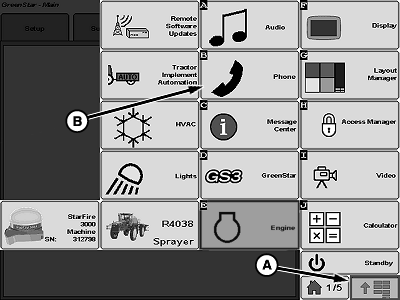
N110823-UN-10MAR14A - Menu Button
B - Phone Button
Press menu button (A). -
Press phone button (B).
-
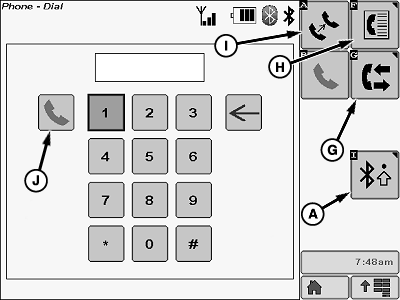
N110824-UN-10MAR14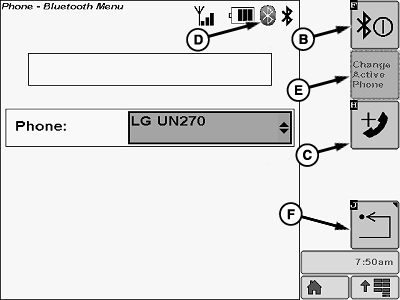
N110825-UN-10MAR14A - Connection Setup Softkey
B - Connection Enable Softkey
C - Add Phone Softkey
D - Bluetooth Symbol
E - Change Active Phone Softkey
F - Return Softkey
G - Call History Softkey
H - Phone Book Softkey
I - Audio Transfer Softkey
J - Call Button
Press connection setup softkey (A) to connect a device.-
Press connection enable softkey (B) to enable Bluetooth on radio.
-
Press add phone softkey (C) to connect phone to radio.
-
On the cell phone, select New Device or BOSCH BT (if already setup) and start the connectivity search. As soon as the cell phone has established the connection, you are prompted to enter the PIN.
-
Enter the numbers (XXXX) displayed on the screen into the cell phone and confirm, if necessary.
-
If pairing was successful, the Bluetooth symbol (D) will be displayed. Then the name of the paired cell phone will be displayed.
-
Press change active phone softkey (E) to choose between phones that have previously been connected to radio and that are in range. Five phones can be stored in the memory for future use.
-
Press return softkey (F) to return to phone home screen.
-
-
Press the call history softkey (G) to view the following.
- Missed calls
- Dialed calls
- Received calls
-
Press phone book softkey (H) to display the phone’s contact list.
-
Press audio transfer softkey (I) to change phone output from radio to phone.
-
Press call button (J) to dial a call after phone number has been input using the keypad.
|
Bluetooth is a trademark of Bluetooth SIG |
CS12167,0000561-19-20140310 |