Fill Solution Tank with Target Fill—If Equipped
-
 CAUTION: Read carefully the directions printed on the chemical
manufacturer's labels before handling chemicals, exposure to hazardous
materials could poison and injure you.
CAUTION: Read carefully the directions printed on the chemical
manufacturer's labels before handling chemicals, exposure to hazardous
materials could poison and injure you.IMPORTANT: Do not add chemical to tank until just before field use. Follow the chemical manufacturer's instructions for mixing the spray solution to obtain the desired application rate and effect.
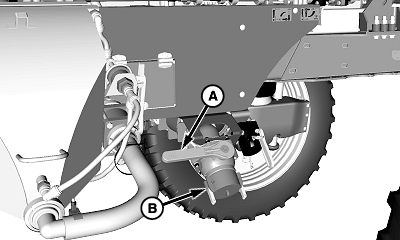
CAUTION: Quik-Fill valve (A) can contain hazardous materials
which can poison causing serious injury or death to you or others.
Before removing Quik-Fill cap (B), verify Quik-Fill valve is closed.NOTE: Side Quik-Fill procedure shown front fill procedure similar.
Target fill will not function when filling tank with nurse pump (push on).
N99947-UN-11JUL13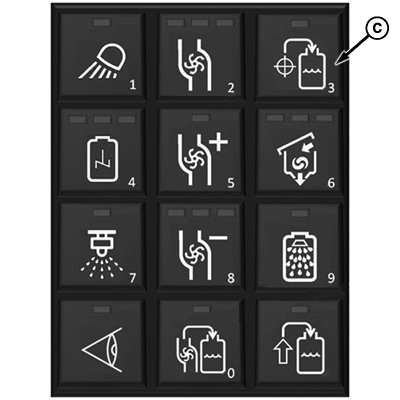
N103859-UN-30MAY13Key Pad
N116421-UN-04MAR15A - Quik-Fill Valve
B - Cap
C - Target Fill Button
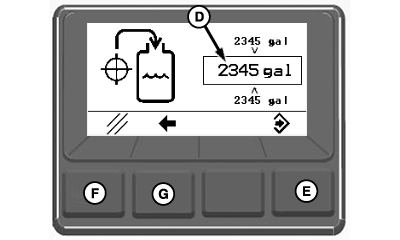
D - Target Fill Volume
E - Enter Button
F - Cancel Button
G - Back Button
Verify Quik-Fill valve (A) is closed. -
Open lock levers and remove cap (B).
-
Connect nurse tank fill hose to Quik-Fill adapter, close lock levers, and open nurse tank valve.
-
IMPORTANT: Prevent solution pump damage caused by running pump dry, observe the following guidelines:
- Ensure fill hose is the shortest length possible
- If solution tank is empty perform a low volume rinse cycle to prime pump. See Operate Rinse System in this section.
- Rinse cycle can be ended after pump priming is achieved.
Open Quik-Fill valve, press target fill button (C).
-
NOTE: If target fill volume is set using the GreenStar display or is the same as the last loaded volume then press enter button (E) to confirm fill volume and begin fill procedure.
Set desired target fill volume (D) using keypad.
-
Press enter button to confirm and begin fill procedure.
NOTE: Press cancel button (F) to end and exit the target fill procedure. Press the back button (G) to return to the previous screen view.
-
After solution tank has filled to preset level, close nurse tank and Quik-Fill valves.
-
Remove fill hose from Quik-Fill adapter and replace cap.
|
CS12167,000072F-19-20150312 |