Operating BoomTrac Pro
N103024-UN-24APR13
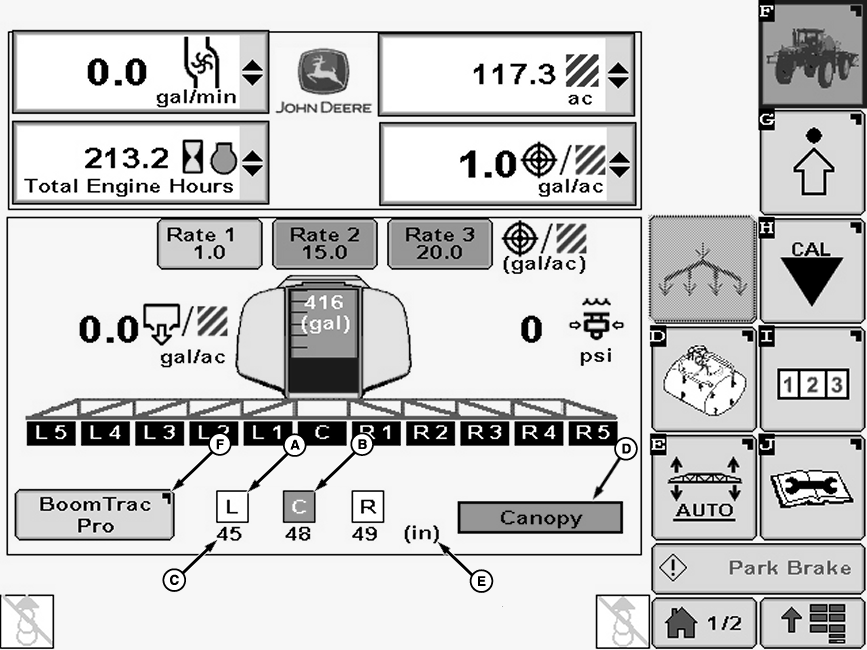
A - Square
B - Highlighted Section
C - Actual Height
D - Sensor Target Mode
E - Unit of Measure
F - BoomTrac Pro Button
IMPORTANT: Display screens illustrated on the following pages are for reference only. Your actual screens may appear differently due to connection of optional devices, software version in use, or customization of screens.
A BoomTrac Pro section will be shown on Sprayer Main Page. A brief explanation of this section follows:
The squares (A) around L, C, and R indicate that BoomTrac Pro is ready for operation and no faults are present. When BoomTrac Pro is activated each section (L, C, or R) will be highlighted (B) and stay highlighted while being controlled. To see which direction Boom Trac Pro is controlling a particular section (L, C, or R) press the Boom Trac Pro button (F) and look for the arrows indicating the direction of control.
The numbers (C) (45, 48 and 49 in this example ) below L, C, and R indicate the actual height of each boom section.
The word “Canopy” (D) was an option also selected in the “BoomTrac Pro” setup page. This indicates that the user is operating in the “Canopy” mode. The other option is “Ground” mode.
The “(in)” (E) indicates that the actual heights being displayed are in inches.
The box surrounding “Canopy” or “Ground” mode indicates that BoomTrac Pro is active (meaning that the resume switch on the multifunction control handle has been pressed and BoomTrac Pro is actively controlling the booms).
Pressing the BoomTrac Pro button (F) takes the operator to BoomTrac Pro setup page.
Activating The System
N71685-UN-09MAR06
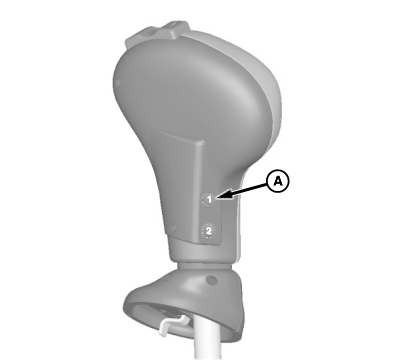
A - Number #1 Button
 CAUTION: Stand clear of booms when BoomTrac is activated. Booms
will move when objects are moved within sensor range.
CAUTION: Stand clear of booms when BoomTrac is activated. Booms
will move when objects are moved within sensor range.
NOTE: The operator needs to be in the seat to activate. The system will also deactivate if the operator gets out of the seat.
To activate the BoomTrac Pro system, press the BoomTrac Resume Switch (A) on the resume pod of the multifunction control handle. This activates the system and begins to actively control the boom tilt functions and center frame relative to the contours of the ground.
The system is turned off by activating center frame raise or lower function. If the operator hits the left or right tilt function the system will turn off that section as well as the center frame. The operator can raise the center boom section to the desired target height then (this feature only works when match to center frame target height mode is selected) press and hold the resume button for three seconds and the system will store the current heights as the new target heights. You must press the BoomTrac Resume Switch on multifunction control handle again to resume BoomTrac Pro.
NOTE: If the BoomTrac Pro system has been enabled on the setup page the “L”, “C”, and “R” will NOT have boxes around them.
|
CS12167,0000764-19-20150330 |