Evacuate Load Command
Automatic Load Command Evacuation
From GS3 Display Main Menu select Sprayer icon.
N87286-UN-20NOV09
N91670-UN-02MAR11
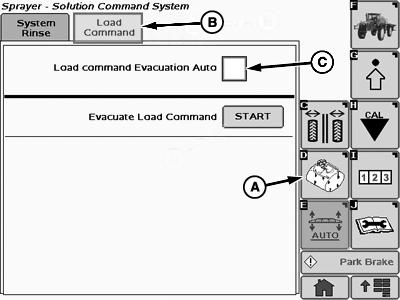
A - Solution Command System Rinse Softkey
B - Load Command Tab
C - Check Box
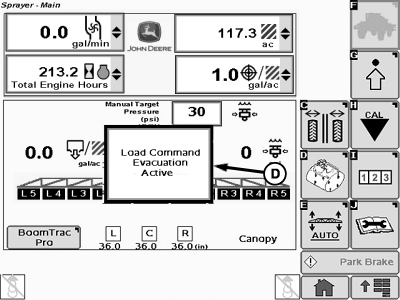
D - Status Message
To automatically evacuate Load Command:-
Select Solution Command System Rinse softkey (A).
-
Select Load Command tab (B).
-
Select check box (C) next to “Load Command Evacuation Auto”.
NOTE: Automatic Load Command evacuation will evacuate after each Load Command fill.
Once the box for auto evacuation is selected, the text "Evacuate Load Command" and the Start button will disappear. If the operator unchecks auto evacuation, then both reappear.
If spraying with a single solution, operator can choose manual evacuation and reduce evacuation times by reducing number of evacuation events.
Evacuation of Load Command should be performed on level surface for optimal performance. If loading on an unlevel surface, choose manual setting and perform the evacuation of Load Command when on level surface. Failure to evacuate on level surface may result in reduced evacuation performance and additional solution remaining in Load Command system.
-
Evacuation will start at the end of the loading process. A message providing the status of evacuation as “Load Command Evacuation Active” will show on the Sprayer Main page.
-
The engine will revert to the throttle setting and the message will disappear when the evacuation is complete.
Manual Load Command Evacuation
From GS3 Display Main Menu select Sprayer icon.
N116948-UN-02APR15
N91669-UN-02MAR11
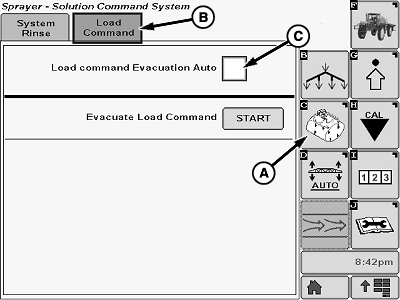
A - Solution Command System Rinse Softkey
B - Load Command Tab
C - Start Button
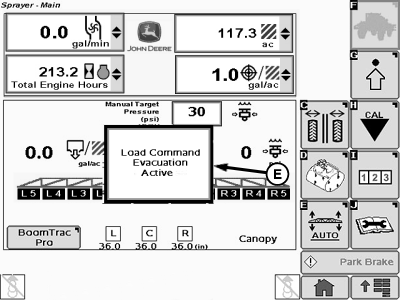
D - Sprayer Main Softkey
E - Status Message
To manually evacuate Load Command:-
Select Solution Command System Rinse softkey (A).
-
Select Load Command tab (B).
-
NOTE: Evacuation of Load Command should be performed on level surface for optimal performance. Failure to evacuate on level surface may result in reduced evacuation performance and additional solution remaining in Load Command system
Press “Start” button (C) next to “Evacuate Load Command”.
-
Engine speed will change to 1800 rpm and evacuation will start.
-
Select Sprayer Main softkey (D) to go to Sprayer Main page. A message (E) providing the status of evacuation as “Load Command Evacuation Active” will show on the Sprayer Main page.
-
The engine will revert to the throttle setting and the message will disappear when the evacuation is complete.
|
CS12167,0000772-19-20150402 |