Calibrate Load Command Pump
The Load Command pump calibration routine is intended to establish the control parameters of the Load Command system.
The only time calibration is needed is when the A1 and B1 values (represented by the digits following the A1 and B1 letters on display) do not lie within their ranges or when one of the following has been replaced:
- Solution pump/hydraulic motor assembly
- Proportional valve
- Hydraulic pump
- SRC
- LCC
NOTE: The A1 and B1 ranges are:
|
Load Command Calibration Data |
||
|
Speed (rpm) |
Current (mA) |
|
|
A1 |
300 - 310 |
800 - 1400 |
|
B1 |
550 - 600 |
1400 - 2000 |
To calibrate the Load Command pump:
NOTE: Solution pump switch should be turned off to perform this procedure.
Hydraulic oil should be warm during the pump calibration procedure.
-
NOTE: Prime Load Command pump if it has been serviced or replaced.
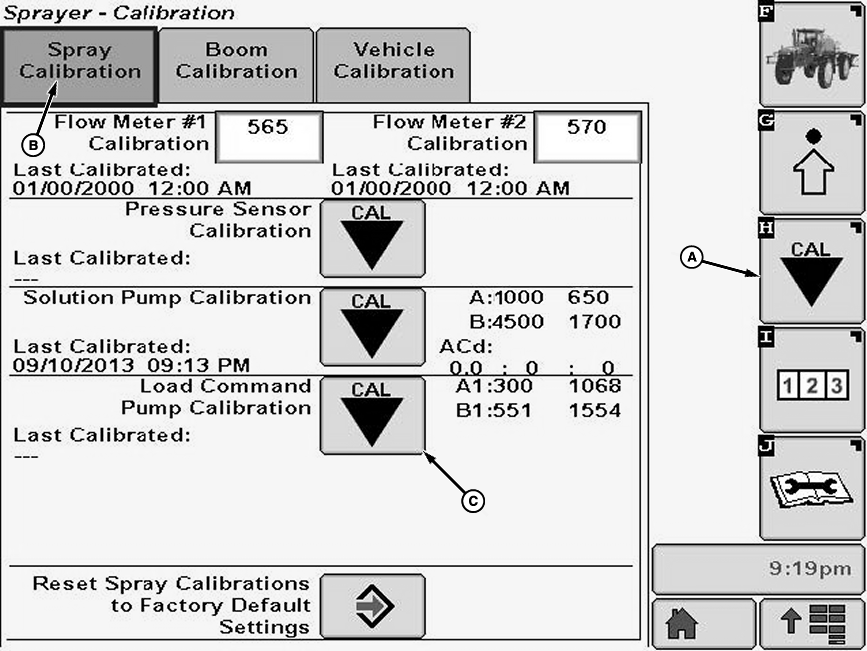
N116949-UN-02APR15A - Calibration Softkey
B - Spray Calibration Tab
C - Calibration Icon
Operate engine at full throttle and warm hydraulic fluid temperature to normal operating range of 65-88° C (150 -190° F). -
Select the Calibration softkey (A) to view the setup menu.
-
Select the Spray Calibration tab (B).
-
Select calibration icon (C) next to Load Command Pump Calibration. Pump Calibration will appear.
-
NOTE: Warm hydraulic fluid temperature to temperature indicated on the screen before calibration and fill solution tank with enough water or solution to keep pump from running dry.
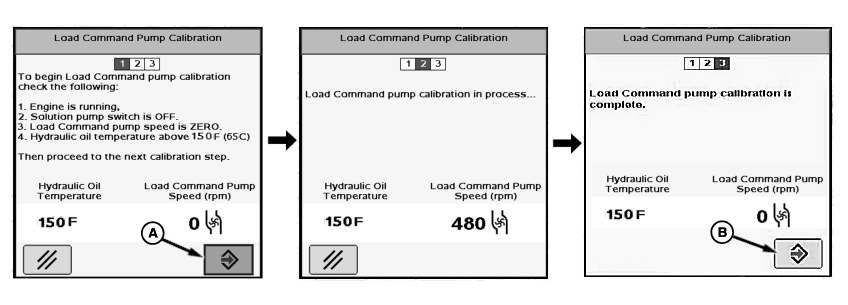
N87272-UN-16NOV09A - Enter Button
B - Enter Button
Follow instructions on first screen. When finished select “Enter” button (A) to proceed to next screen. -
NOTE: Pump calibration will take approximately 1-2 minutes. The Load Command pump will turn off when calibration is done.
“Load Command pump calibration is complete.” will be displayed. Press “Enter” button (B) to return to Spray Calibration tab.
|
CS12167,0000773-19-20150402 |