Controls and Instruments - Standard Radio
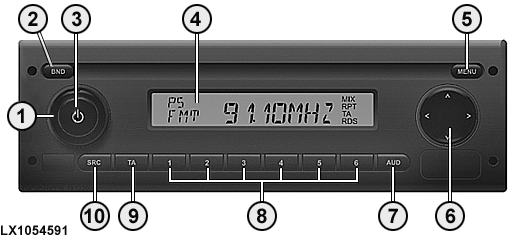
LX1054591-UN-25AUG11
|
Location |
Designation |
Function |
|
1 |
Volume Control |
|
|
2 |
BND |
Press briefly to select memory level or wave band |
|
Press and hold to start the Travelstore function |
||
|
3 |
On/Off key |
Press briefly to switch the radio on |
|
Press briefly during operation to mute the radio |
||
|
Press and hold to switch the radio off |
||
|
4 |
Display |
Change the display |
|
5 |
Menu |
Calling up the menus for the basic settings |
|
6 |
Multi-function rocker switch |
Navigate within the display and switch functions |
|
7 |
AUD key |
Press briefly to open audio menu to set bass, mid-range, and treble tone controls, balance, fade* and loudness |
|
Press and hold to restore factory sound settings (treble and bass for the currently used audio source only) |
||
|
8 |
1 - 6 key block |
Station keys |
|
9 |
TA key |
Switch back from user and audio menus to current source. Exit the radio scan functions. Switch the priority for traffic announcements on/off. Cancel a traffic announcement while in process (Europe only). |
|
10 |
SRC Key |
Source selection between radio and AUX |
|
*Fade is only possible if front as well as rear loudspeakers are connected. |
||
|
OULXBER,0001BF2-19-20140206 |