Spreader Bin Setup
-
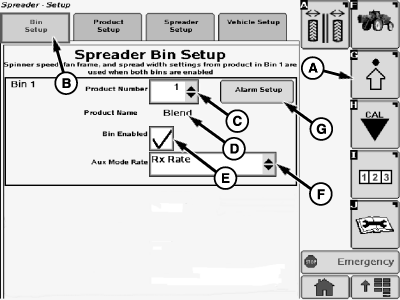
N82561-UN-09DEC08Single Bin Setup
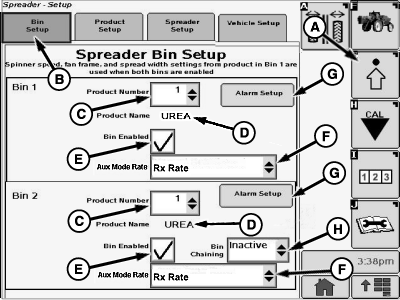
N87284-UN-25NOV09Dual Bin Setup
A - Setup Softkey
B - Bin Setup Tab
C - Drop-down Box
D - Product Name
E - Check Box
F - Drop-down Box
G - Alarm Setup Button
H - Drop-down Box
Select the Setup softkey (A) to view the setup menu. -
Select the Bin Setup tab (B).
-
Select drop-down box (C) to select between 6 programmable products. When one is selected the product name is displayed at location (D).
-
Select check box (E) to enable / disable the bin.
-
NOTE: The following rate mode selection is also used in Spreader Check Test menu and overrides any other previous selection.
Select drop down box (F) to select the mode the spreader will operate in while the rate-select dial is in the Aux position. This menu allows an operator to spread a prescription rate with one bin and a target rate with the other bin with the dial in the Aux position.
NOTE: This drop down menu is only available when the rate-select dial is in the Aux position.
-
Selecting the Alarm Setup button (G) allows the operator to toggle between five percentage settings or off for spinner, density setting, and rate alarms.
-
Select drop-down box (H) to select bin chaining mode (dual-bin setup only with same product in both bins).
Bin Chaining modes available:
- Inactive
- Auto: 1 to 2
- Auto: 2 to 1
- Manual: 1 to 2
- Manual: 2 to 1
NOTE: Bin 1 refers to front product bin and bin 2 refers to rear (back) product bin.
Selecting a bin chaining mode will clear the Product Number for each bin. The same product number must be selected for each bin prior to bin chaining operation.
|
OUO6092,000028E-19-20091125 |