Setup Orifice Valve
-
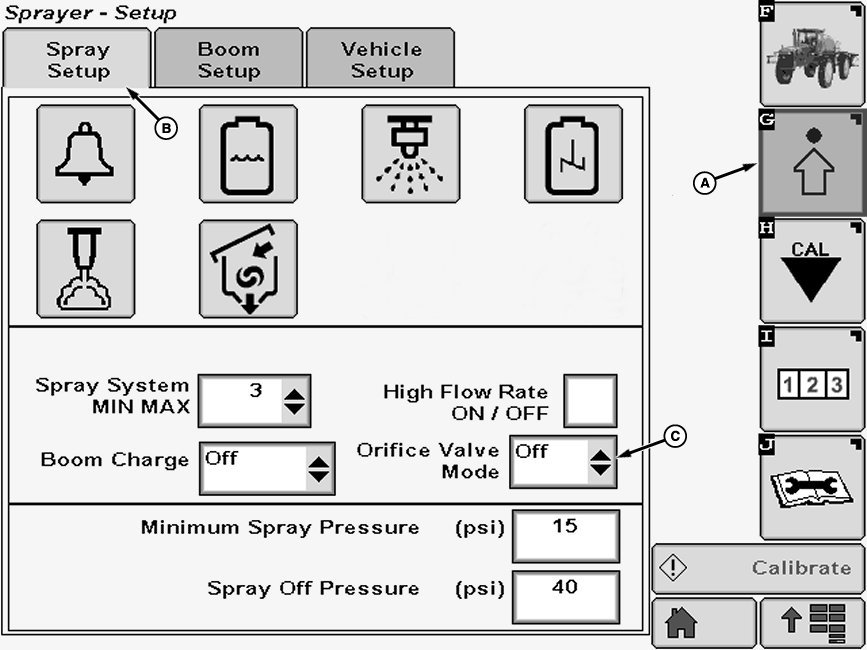
N102640-UN-08MAR13A - Setup Softkey
B - Spray Setup Tab
C - Check Box
Select the Setup softkey (A) to view the setup menu. -
Select the Spray Setup tab (B).
-
Select ON or OFF from drop-down box (C).
-
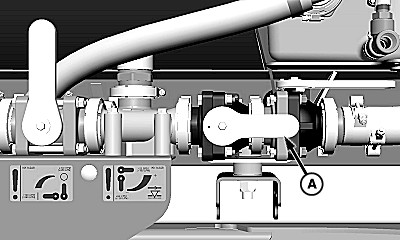
N103522-UN-24APR13Orifice Valve ON (High Flow)
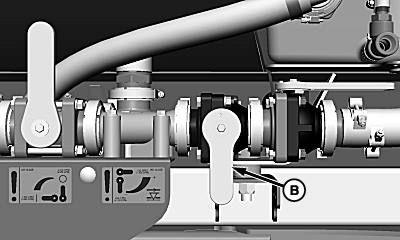
N103405-UN-24APR13Orifice Valve OFF (Low Flow)
A - Orifice Valve ON Position (High Flow)
B - Orifice Valve OFF Position (Low Flow)
ON—Orifice valve in HIGH flow position (A). - OFF—Orifice valve in LOW flow position (B).
IMPORTANT: If orifice valve and display selection do not match then application rates may be effected as follows:
- Orifice valve in low flow position (OFF) and display is set to ON then rate control may be slow to respond.
- Orifice valve in high flow position (ON) and display is set to OFF then rate control may be unstable.
NOTE: The orifice valve must be set manually, selecting ON or OFF will NOT change the orifice valve setting.
-
|
OUO6092,000080B-19-20130423 |