Setup Boom Return To Height
-
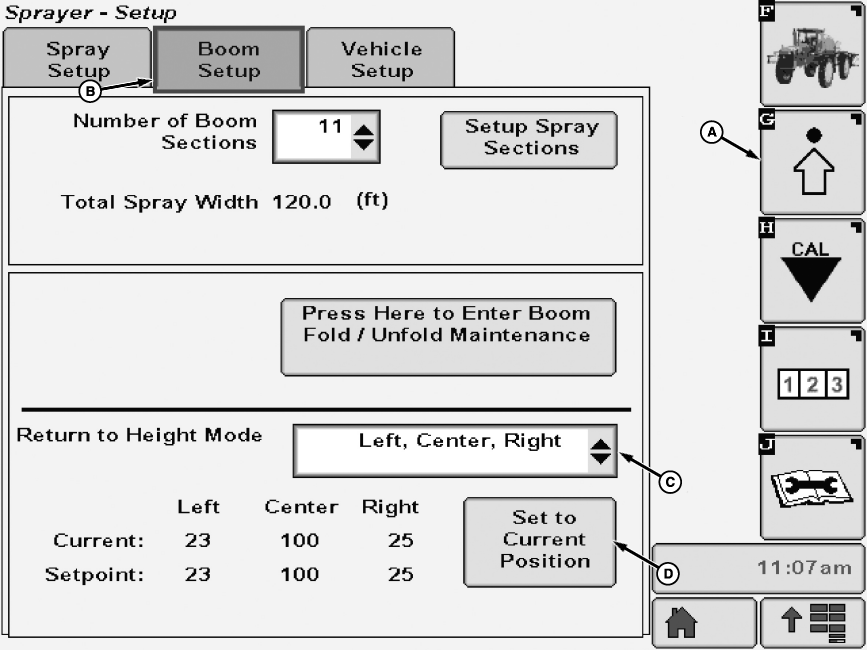
N102020-UN-08APR13A - Setup Softkey
B - Boom Setup Tab
C - Drop-Down Menu
D - Set to Current Position Button
Select the Setup softkey (A). -
Select the Boom Setup tab (B).
-
Select desired return to height mode from drop down menu (C). Operator may choose from the following modes:
- OFF— Return to height is not active.
- CENTER— Height is set for center frame only, boom wings are not limited.
- LEFT and RIGHT— Height is set for boom wings only, center frame is not limited.
- LEFT, CENTER, RIGHT— Height is set for center frame and boom wings.
-
Move boom up or down and adjust boom wings to desired height.
-
Press set to current position button (D).
|
OUO6092,0000811-19-20130423 |