Calibrate Boom Return To Height
-
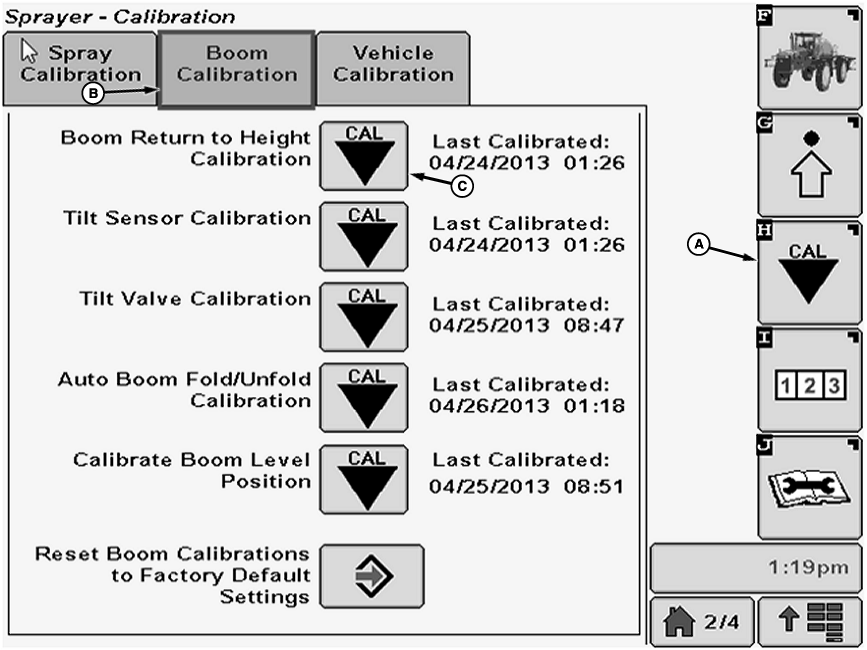
N101919-UN-08MAY13A - Calibration Softkey
B - Boom Calibration Tab
C - Calibration Icon
Select the Calibration softkey (A) to view the setup menu. -
Select the Boom Calibration tab (B).
-
Select Calibration icon (C) next to Boom Return to Height Calibration. Boom Return to Height Calibration screen will appear.
-
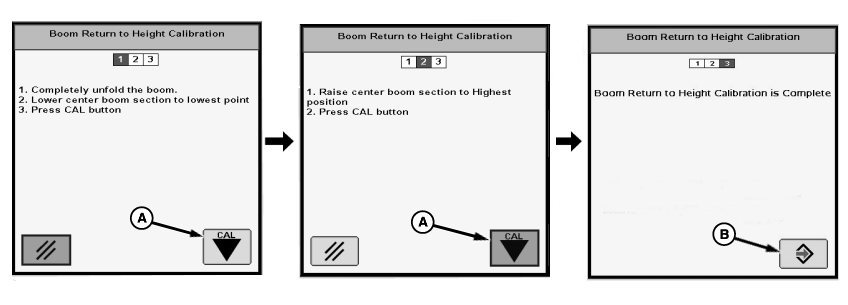
N101920-UN-12FEB13A - Cal Icon
B - Enter Button
Follow instructions on first screen. When finished select Cal icon (A) to proceed to next screen. -
Follow instructions on second screen. When finished select Cal button (A) to proceed to next screen.
-
“Boom Return To Height Calibration is Complete.” will be displayed. Press Enter button (B) to return to Boom Calibration tab.
|
OUO6092,0000815-19-20130424 |