Spray Setup
N102637-UN-08MAY13
SPRAYER SETUP
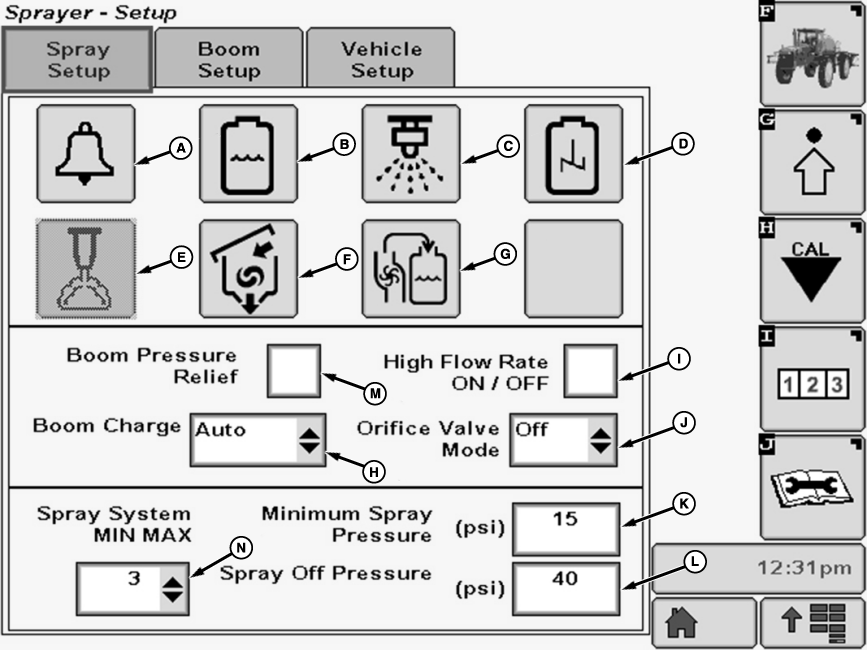
The following are displayed and can be changed:
A- Alarm Setup— Allows the operator to turn on or off a flow rate error, sections off and low tank volume alarms.
B-Tank Volume—Where tank volume is programmed into SprayStar.
C-Spray Tip Calculator—Where the spray tip calculator can be viewed.
D-Agitation—Where agitation valve openings (LOW, MEDIUM, AND HIGH) can be selected.
E-Foam Marker— Allows the operator to change setting of foam marker from AUTO , MANUAL, and OFF.
F-Eductor—Where eductor settings (LOW, MEDIUM, AND HIGH) can be selected.
G-Target Fill—Allows the operator to set the desired tank fill volume.
H-Boom Charge—Allows the operator to charge the boom at an automatically calculated pressure (Boom Charge Pressure) for 3 seconds after the master ON/OFF switch (A) is pressed “ON”.
I-High Flow Rate ON/OFF (If Equipped)—Allows the operator to enter position of high flow rate valve. A check in the box indicates High Flow Rate ON (dual flowmeters in use), no check indicates High Flow Rate OFF (single flowmeter in use).
J-Orifice Valve Position—Allows operator to enter position of orifice valve (ON/OFF).
K-Minimum Pressure—Where the minimum pressure is programmed into SprayStar. Minimum pressure is the minimum pressure maintained while spraying.
L-Spray Off Pressure—Where the spray off pressure is programmed into SprayStar. Spray off pressure is the pressure maintained while not spraying. Typically used to maintain high pressure setting for agitation when not spraying. It should not be used as a means for boom charge compensation.
M-Boom Pressure Relief—Allows the operator to enable boom pressure relief by checking the box on display screen.
N-Spray System MIN/MAX—Allows the operator to adjust the response time of the SprayStar rate control.
|
OUO6092,000091D-19-20150129 |