Turn Flow Rate Alarm On/Off
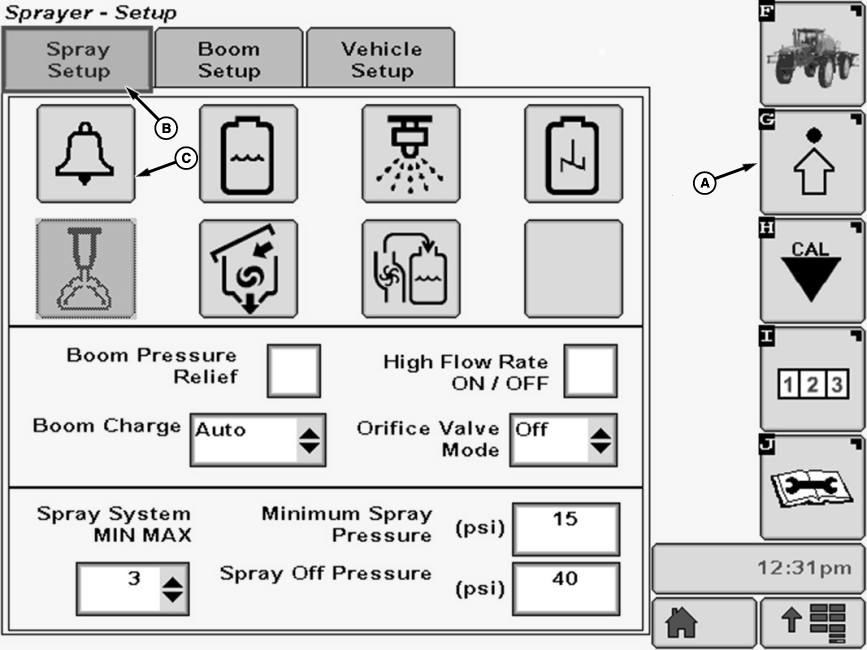
N101900-UN-08MAY13
A - Setup Softkey
B - Spray Setup Tab
C - Alarm Setup Button
The flow rate alarm tells the operator when the sprayer applies more or less than 20% of the target application for 6 continuous seconds. LOW SOLUTION FLOW or HIGH SOLUTION FLOW also appears on the Sprayer Main Page.To activate or deactivate alarm:
-
Select the Setup softkey (A) to view the setup menu.
-
Select the Spray Setup tab (B).
-
Press Alarm Setup button (C). The Alarm Setup screen will appear.
-
NOTE: A check mark in the box indicates that Flow Rate Alarm is activated.
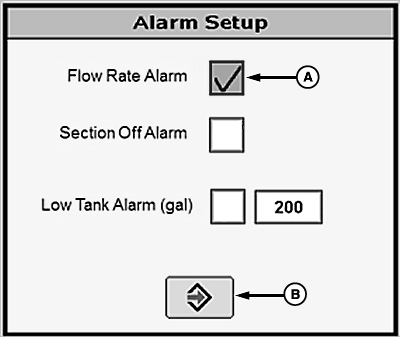
N113704-UN-03FEB15A - Check Box
B - Enter Button
Select check box (A) next to Flow Rate Alarm and a check will appear inside box activating item. To deactivate a check box, touch check box to remove the check. -
Select the enter button (E) to return to Spray Setup screen.
|
OUO6092,000091E-19-20150203 |