Turn Low Tank Volume Alarm On/Off
N101900-UN-08MAY13
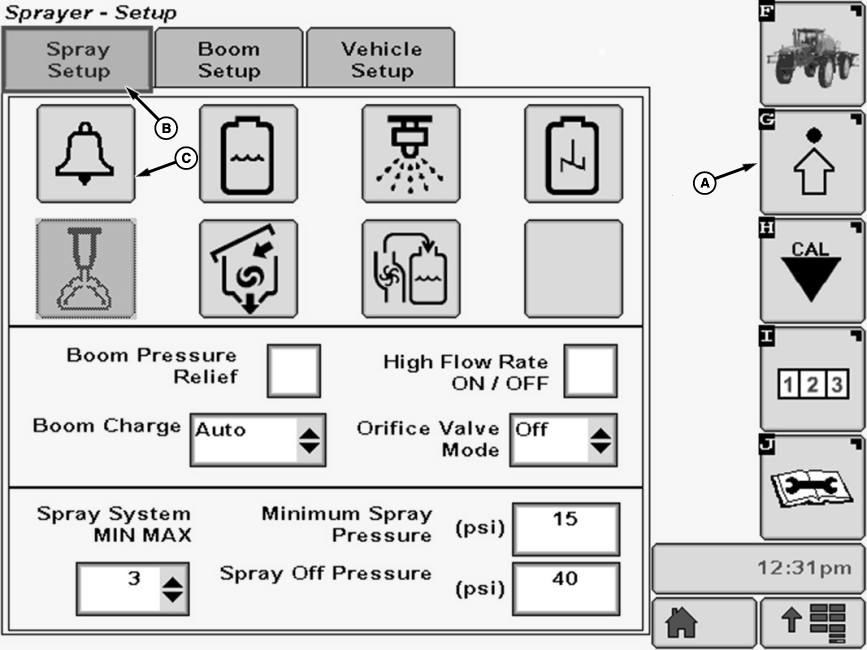
A - Setup Softkey
B - Spray Setup Tab
C - Alarm Setup Button
The Low Tank Volume alarm occurs when the tank volume lowers to a chosen level.-
Select the Setup softkey (A) to view the setup menu.
-
Select the Spray Setup tab (B).
-
Press Alarm Setup button (C). The Alarm Setup screen will appear.
-
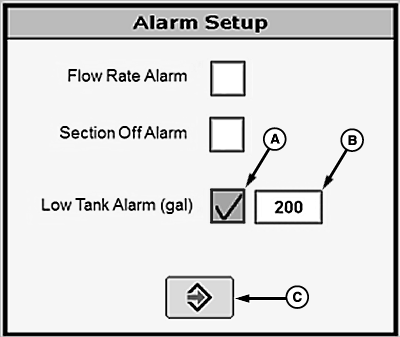
NOTE: A check mark in the box indicates that Low Tank Volume Alarm is activated.
N113706-UN-03FEB15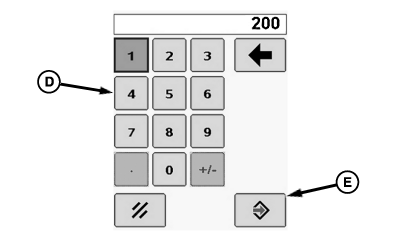
N113707-UN-03FEB15A - Check Box
B - Enter Button
C - Volume Input Box
D - Pop-up Keyboard
E - Enter Button
Select check box (A) next to Section Off Alarm and a check will appear inside box activating item. To deactivate a check box, touch check box to remove the check. -
Select input box (B) and enter the volume that will trigger the alarm using pop-up keyboard (D). Select Enter button (E) to accept value.
-
Select the enter button (C) to return to Spray Setup screen.
|
OUO6092,0000920-19-20150203 |