Auto System Prime
 CAUTION: Spray system can contain hazardous material which can
cause serious injury or death to you or others. Wear protective clothing,
eyewear, and gloves. Apply chemical solutions in an area where people,
animals, vegetation and water supply etc., cannot be contaminated.
CAUTION: Spray system can contain hazardous material which can
cause serious injury or death to you or others. Wear protective clothing,
eyewear, and gloves. Apply chemical solutions in an area where people,
animals, vegetation and water supply etc., cannot be contaminated.
CAUTION: Do not turn on the machine until you are sure nobody
is in the danger zone.
Auto system priming is a sprayer feature that allows the operator to fully charge the solution system (and direct injection plumbing) with chemical or mixed solution so that the sprayer is ready to begin field spraying.
-
Unfold booms and lower center frame.
-
Verify that pumps have been primed.
-
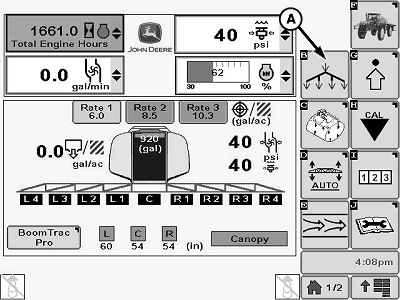
N116937-UN-02APR15A - Auto Prime Softkey
Select Auto Prime softkey (A) from sprayer main page. -
NOTE: All spray sections turn on automatically during Auto Prime process.
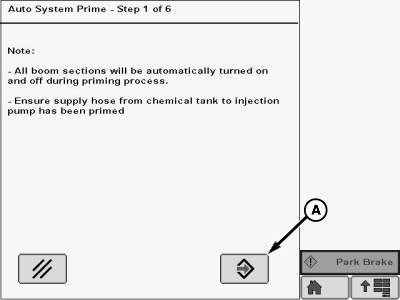
N94008-UN-07SEP11A - Enter Button
Verify that conditions on screen have been met, then select Enter button (A) to continue to next step. -
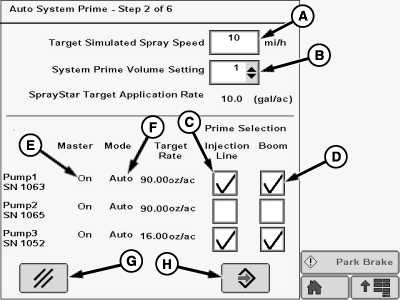
N94387-UN-08SEP11A - Target Speed Input Box
B - Drop-Down Menu
C - Check Box
D - Check Box
E - Pump Status
F - Pump Mode
G - Cancel Button
H - Enter Button
Enter a target spray speed between 10 and 20 miles per hour in input box (A). -
NOTE: Setting 3 is the default prime volume setting and selecting it should completely prime the system on any size of booms. Settings 1 and 2 each lower the priming volume. Settings 4 and 5 raise the priming volume.
Select a System Prime Volume setting three from drop-down menu (B).
-
NOTE: Pump status (E) under Master will be On if the pump has been enabled or a red X if the pump is disabled.
Auto priming only works when injection pumps are set to Auto mode (F). If pumps are not set to Auto mode or machine is not equipped with direct injection, a red “X” will be displayed.
Select the check box (C) for each injection pump to have its injection line primed out to the injection mixing module.
-
Select the check box (D) for each injection pump to have its output primed through the entire boom.
-
Press enter button (H) to proceed or press (G) to cancel.
-
NOTE: Any pumps not selected for auto system prime will show no flow during the process.
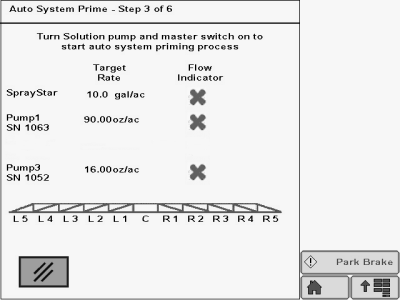
N94078-UN-08SEP11A - Solution Pump Switch
Follow instructions in the screen to start the priming procedure. -
N94013-UN-08SEP11A - Flow Indicator
B - Flow Indicator
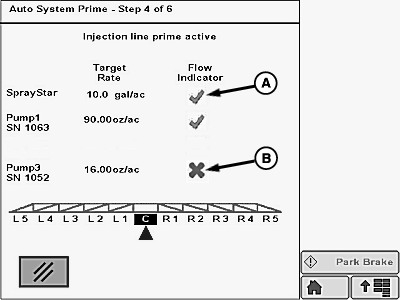
The injection line prime will run first. The flow indicator will be a Green check mark (A) if flow is greater than zero. The flow indicator will be a red X (B) if the flow rate is zero. -
N94014-UN-08SEP11A - Spray Indicator
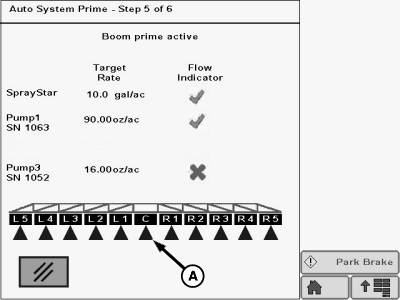
The Boom Prime will run next.NOTE: Active or open spray sections (A) are indicated with the standard blue indicator.
All sections will automatically turn on and off, starting with center section and working out, during this procedure.
Approximate prime time for injection line is 30-40 seconds.
Approximate prime time for overall boom is 2 minutes.
-
N94389-UN-01SEP11A - Auto System Prime Complete
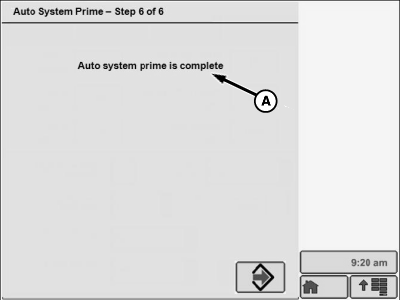
Auto System prime complete (A) message will show on display screen when prime is complete.
|
OUO6092,000092A-19-20150330 |