Operate Tread Adjust
 CAUTION: Transport machine at narrowest tread adjust setting
only.
CAUTION: Transport machine at narrowest tread adjust setting
only.
NOTE: Calibration procedure must be done first.
Wheels can be adjusted to any wheel spacing between 3048 mm (120 in.) and 4064 mm (160 in.).
Machine travel speed must be between 1 km/hr (0.6 mph) and 8 km/hr (5 mph) or tread adjust will not operate.
IMPORTANT: Machine damage can occur to suspension and wheel assembly if tread width is adjusted when machine is not moving.
NOTE: If sticking occurs, remove debris from axle knees and spray with MCB004 HiTech Lube or TY25733 TEFLON® based lubricant. Activate tread adjust in and out until free.
Verify that tread adjust shims are properly adjusted. (See Check Shim Gap on Axle Tread Adjust—250 Hours in Lubrication and Maintenance section of this manual.)
-
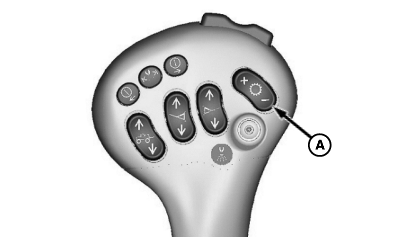
N80284-UN-17MAR08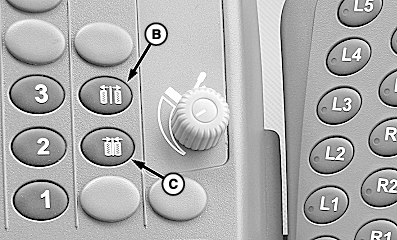
N103142-UN-10APR13A - Speed Increase/Decrease Switch
B - Tread Out Switch
C - Tread In Switch
Start machine. Using Speed Increase/Decrease switch (A) on multi-function lever, shift machine to lowest target speed. -
Press tread OUT (B) or tread IN (C) switch. Tread adjust screen appears.
-
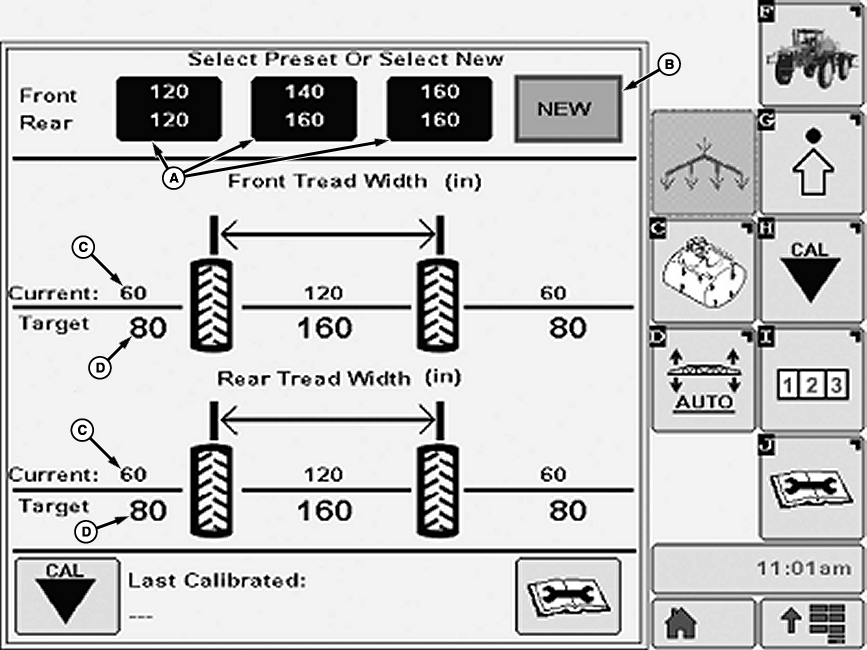
N103141-UN-10APR13A - Preset Widths
B - New Button
C - Current Width
D - Target Width
Select from preset widths (A) or press New button (B). -
NOTE: Axles can be adjusted to any wheel spacing between 3048 mm (120 in.) and 4064 mm (160 in.).
If preset width is selected:
-
Use tread OUT switch while driving ahead to adjust tread width if current width (C) is less than target width (D).
-
Use tread IN switch while driving ahead to adjust tread width if current width is greater than target width. The system will tread IN until the end-stops are met, and then you need to tread OUT to the target width.
-
-
NOTE:
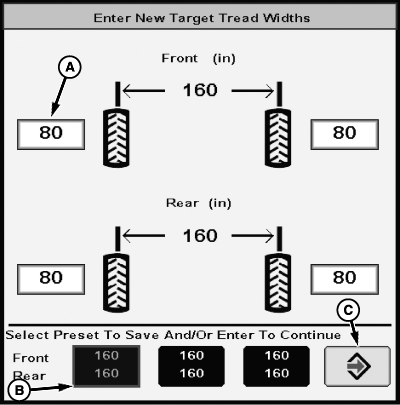
N103143-UN-10APR13A - Input Box
B - Preset Selection
C - Enter Button
Tread width per wheel must be within 1524—2032 mm (60—80 in.).If New setting is selected:
-
Select input boxes (A). Input desired width using pop-up key pad.
-
Select a preset selection (B) to save the new width configuration.
-
Press Enter button (C) to return to tread adjust main page.
-
Use tread OUT switch while driving ahead to adjust tread width if current width is less than target width.
-
Use tread IN switch while driving ahead to adjust tread width if current width is greater than target width. The system will tread IN until the end-stops are met, and then you will need to tread OUT to the target width.
-
|
OUO6092,0000932-19-20150402 |