Fill Solution Tank with Sprayer Pump While Adding Chemicals Through Eductor
-
 CAUTION: Read carefully the directions printed on the chemical
manufacturer's labels before handling chemicals exposure to hazardous
materials could poison and injure you.
CAUTION: Read carefully the directions printed on the chemical
manufacturer's labels before handling chemicals exposure to hazardous
materials could poison and injure you.IMPORTANT: Do not add chemical to tank until just before field use. Follow the chemical manufacturer's instructions for mixing the spray solution to obtain the desired application rate and effect.
CAUTION: Quik-Fill valve (A) can contain hazardous materials
which can poison causing serious injury or death to you or others.
Before removing Quik-Fill cap (B), verify that Quik-Fill valve is
closed.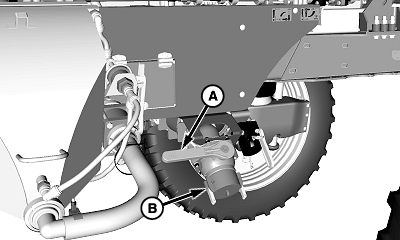
N99947-UN-11JUL13Side Quik-Fill
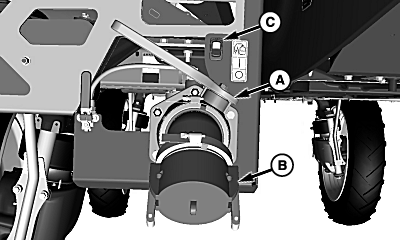
N102217-UN-16MAY13Front Quik-Fill
N94521-UN-08MAY13A - Quik-Fill Valve
B - Cap
C - Switch
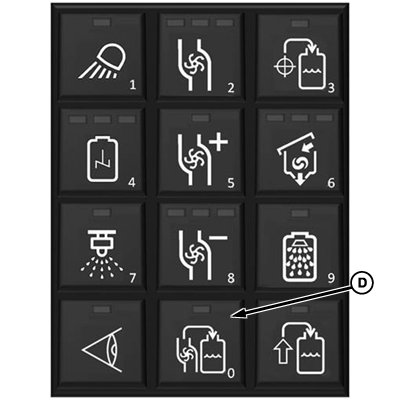
D - Pull-On Fill Button
Verify Quik-Fill valve (A) is closed. -
Open lock levers and remove cap (B).
-
Connect nurse tank fill hose to Quik-Fill adapter, close lock levers.
-
IMPORTANT: Prevent solution pump damage caused by running pump dry, observe the following guidelines:
- Ensure fill hose is the shortest length possible
- If solution tank is empty perform a low volume rinse cycle to prime pump. See Operate Rinse System in this section.
- Rinse cycle can be ended after pump priming is achieved.
Open nurse tank valve.
-
NOTE: For front Quik-Fill, move switch (C) to ON position.
Press pull-on button (D), open Quik-Fill valve.
-
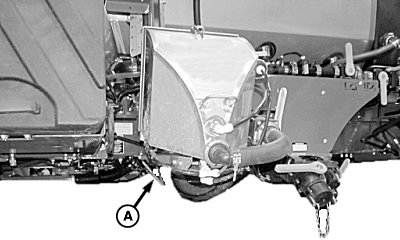
N98892-UN-11SEP13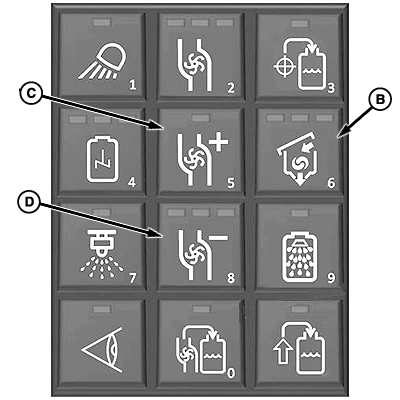
N94522-UN-12SEP13A - Handle
B - Eductor Button
C - Pump Speed Increase Button
D - Pump Speed Decrease Button
Slightly raise eductor and pull handle (A) to unlatch. -
Lower eductor and raise lid.
-
NOTE: Do not start eductor before solution tank is half full to prevent foaming when chemical is added. Tank level can be viewed using the micro display at filling station and the sight gauge.
Operator can choose different default eductor settings (1 - 3) using the GreenStar display in cab.
Setting 1 is the lowest pressure setting and 3 is the highest pressure setting
Press eductor button (B) on keypad.
-
Adjust eductor pressure if desired using pump speed increase button (C) or pump speed decrease button (D).
-
N98795-UN-12SEP13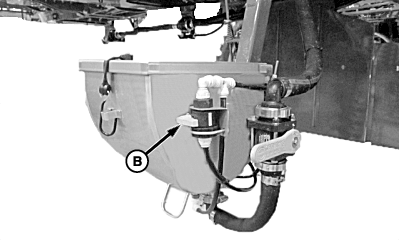
N98796-UN-11SEP13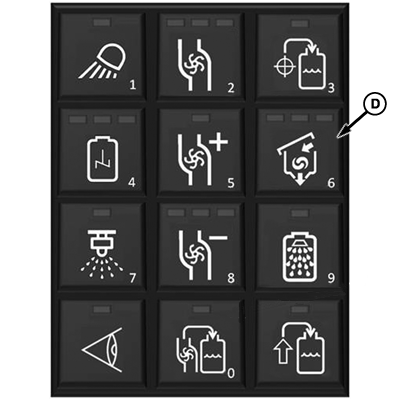
N94523-UN-17SEP12A - Eductor Sump Valve
B - Eductor Rinse Valve
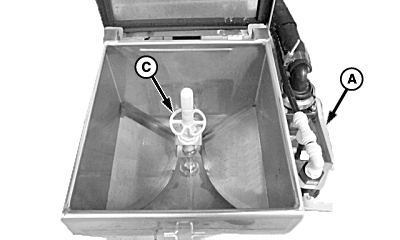
C - Rinse Nozzle
D - Eductor Button
Open eductor sump valve (A) (handle parallel with solution hose) to allow chemicals to be drawn from eductor hopper. -
Open eductor rinse valve (B) (turn clockwise) to rinse eductor hopper.
-
Pour chemicals into eductor.
-
Place chemical container over rinse nozzle (C) in tank and push down on container to rinse.
-
Verify that eductor is empty.
-
Close eductor rinse valve. Close eductor sump valve.
-
Close hopper lid and lift eductor back to original position.
-
Press eductor button (D) to stop eductor.
-
NOTE: Auto fill shuts down when upper tank level switches are reached.
For front Quik-Fill, move switch to OFF position.
After solution tank has filled, close nurse tank and Quik-Fill valves.
-
Remove fill hose from Quik-Fill adapter and replace cap.
|
OUO6092,0000936-19-20150312 |