Operate Boom Air Purge—If Equipped
-
N116941-UN-02APR15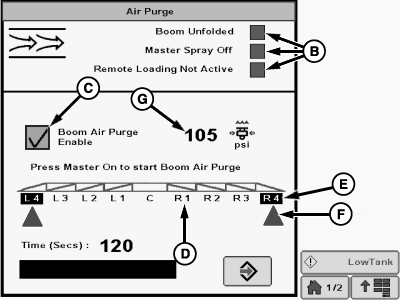
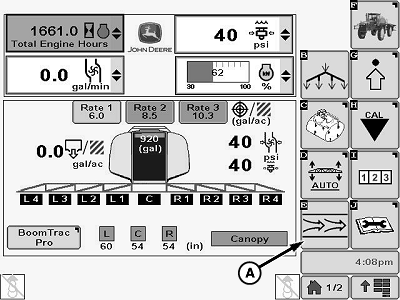
N116122-UN-05MAR15A - Boom Air Purge Softkey
B - Indicators
C - Boom Air Purge Enable Checkbox
D - Disabled Spray Section
E - Enabled Spray Section
F - Cone
G - Air Pressure
Park machine on a level area, unfold booms and position booms level with ground. -
Press Boom Air Purge softkey (A).
-
The following conditions must be met before Boom Air Purge can be used:
- Inner boom sections unfolded
- Master spray must be off for minimum of 2 seconds
- Remote load stations must be inactive
Indicators (B) are green when all conditions are met.
-
Press Boom Air Purge Enable box (C) (check will appear) to start purge process. Instructions to press master spray ON will be displayed under the check box.
-
NOTE: Only enabled boom sections will be purged.
Disabled sections (D) are shown as a dark lettering. Enabled sections (E) are indicated by a dark background and light lettering. A cone (F) will be displayed below active sections during purge process.
Purge boom by enabling only the outermost section on each side and pressing the master spray ON to open section valves.
-
When sections are purged shut them off and open the next section in sequence. Repeat until all sections are purged.
-
Boom sections can be enabled using the boom section switches on CommandARM side console or by using the IBS function on the multi-function lever. Fence row nozzles can also be enabled using right-hand and left-hand fence row nozzle switches on CommandARM.
-
NOTE: Purge timer is 2 minutes. Timer pauses when master spray button is pressed OFF. Air pressure (G) can be monitored and purging can be paused to ensure that sufficient air pressure is available to purge enabled sections.
Purging can be stopped by pressing Boom Air Purge Enable box (C) (check will disappear) or letting timer elapse. Timer resets to 2 minutes when box is pressed again.
-
Repeat procedure if further purging is desired.
Instructions on recharging the boom with liquid will be displayed to reduce trapped air when spraying is resumed.
|
OUO6092,0000952-19-20150327 |