Calibrate Pressure Sensors
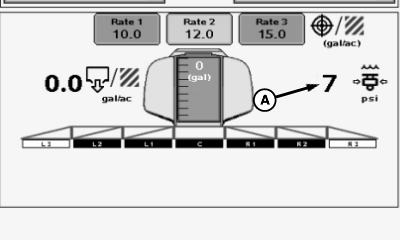
N74946-UN-01FEB07
A - Pressure Reading
If pressure sensor (A) reading does not return to zero when there is no pressure or fluid in boom section shutoff valves, calibration of pressure sensor is necessary.
-
 CAUTION: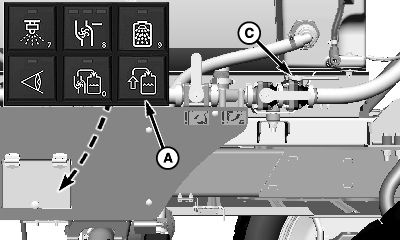
N110636-UN-25FEB14Solution Command System
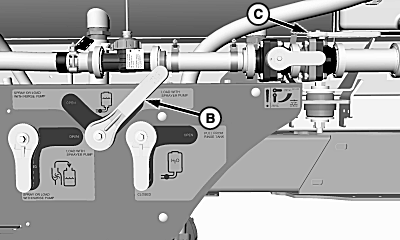
N110637-UN-25FEB14Manual Load System
N110638-UN-25FEB14A - Pull-On Fill Button
B - Solution Tank Sump Valve
C - Flowmeter Shutoff Valve
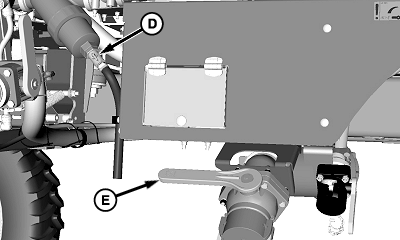
D - Strainer Drain Valve
E - Side Quick Fill Valve
Do not drain solution onto the ground. Drain into a container. Drain solution in an area where people, animals, vegetation, and water supply, etc., cannot be contaminated.NOTE: Solution tank sump valve closes automatically when solution pump is turned off on machines equipped with Solution Command system. Verify pull-on fill button (A) is off.
Close solution tank sump valve (B).
-
Close flowmeter shutoff valve (C).
-
Open strainer drain valve (D) and drain solution into suitable container.
-
Open side quick fill valve (E) and drain solution into suitable container.
-
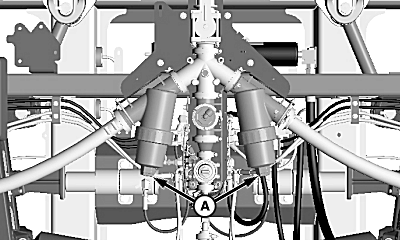
N105921-UN-20AUG13A - Strainer Drain Plugs
Remove strainer drain plugs (A) on boom center frame, catch solution in a suitable container. -
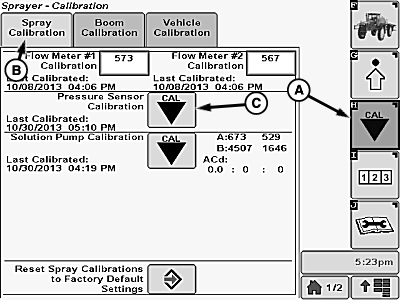
N116123-UN-10MAR15A - Calibration Softkey
B - Spray Calibration Tab
C - Calibration Icon
Select the Calibration softkey (A) to view the setup menu. -
Select the Spray Calibration tab (B).
-
Select calibration icon (C) next to Pressure Sensor Calibration. Pressure Sensor Calibration will appear.
-
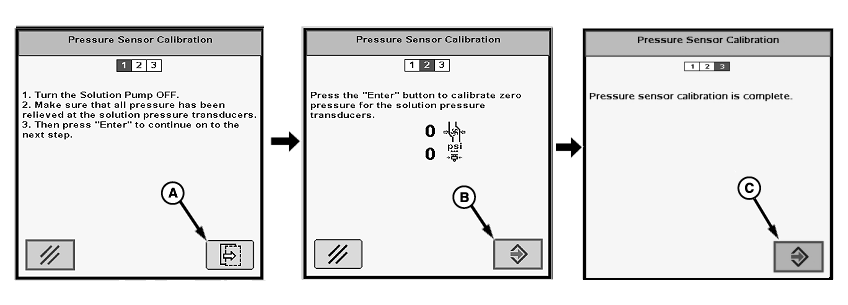
N101918-UN-20AUG13A - Button
B - Enter Button
C - Enter Button
Follow instructions on first screen. When finished select the button (A) to proceed to next screen. -
Follow instructions on second screen. When finished select the Enter button (B) to proceed to next screen.
-
“Pressure sensor calibration is complete.” will be displayed. Press Enter button (C) to return to Spray Calibration tab.
-
Install all previously removed plugs and close all valves.
|
OUO6092,0000954-19-20150310 |