Calibrate Product CFR
Conveyor Feed Rate (CFR) is the volume of material in cm3 spread per revolution of the belt drive roller at a 1.0 cm feed gate opening (cu. ft. per revolution at a 1.0 in. feed gate opening). The calibration procedure requires the ability to capture the product that is dispensed from the spreader belt with the spinners off.
-
NOTE: For best results, use 227— 454 kg (500 —1000 lb.) of product per calibration test.
Load spreader box with a sample of product to calibrate.
-
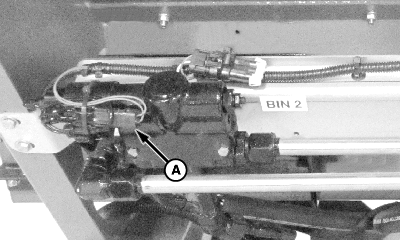
N101125-UN-14NOV12A - Connector
Disconnect connector (A) from spinner PWM valve. -
Position machine so there is access to rear of machine to collect product dispensed during calibration.
NOTE: Prior to beginning calibration, ensure product is dispensing all the way to the spinners. This is very critical for front bin (Bin 1) if a MultiApplier is installed, otherwise the belt runs for a period of time with no product on it resulting in a false calibration value.
-
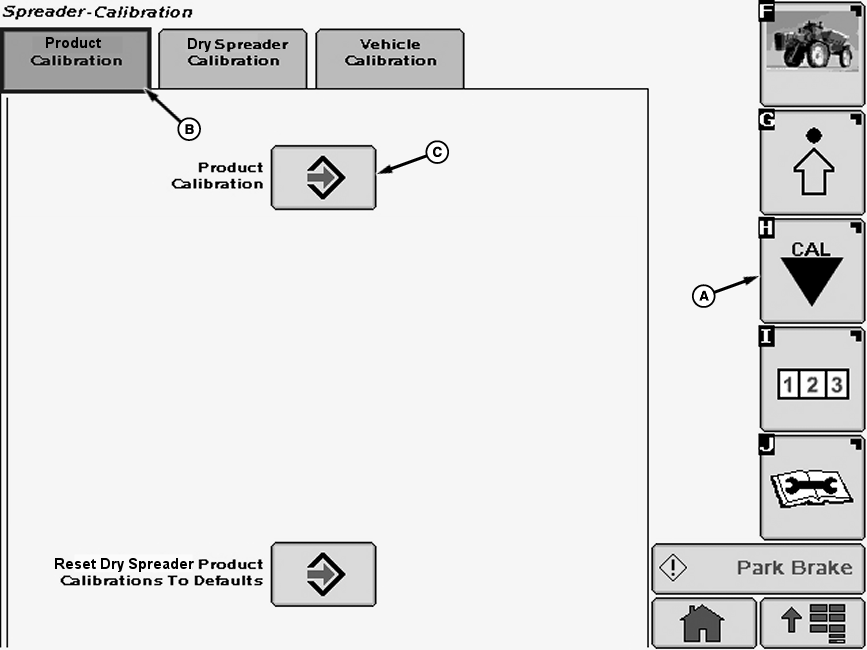
N84196-UN-14APR09A - Calibration Softkey
B - Product Calibration Tab
C - Enter Button
Select the Calibration softkey (A). -
Select the Product Calibration tab (B).
-
Select the Enter Button (C) next to Product Calibration to go the calibration procedure. The “Start Cal” screen appears.
-
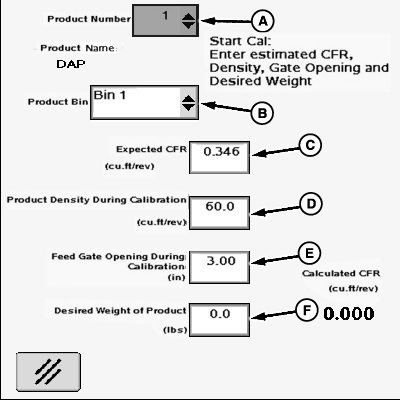
N87285-UN-17NOV09A - Drop-Down Menu
B - Drop-Down Menu
C - Input Box
D - Input Box
E - Input Box
F - Input Box
Select the product to calibrate from drop-down menu (A). -
Select the bin containing the product for calibration from drop-down menu (B).
-
Select input box (C) next to “Expected CFR”. A numeric key pad appears on the screen. Enter the expected CFR for your spreader model as listed in the following table, if the value is different from value displayed. Press “Enter” button on keypad to accept the new value.
Expected CFR Values
CFR (metric)1
CFR (English)2
Conveyor Type
Model
3400
0.305
Straight Belt
Model NL200G4
2854
0.256
Belt Over Chain
3400
0.305
Straight Belt
Model NL300G4
1605
0.144
Belt Over Chain
MultApplier Box
-
Select input box (D) and input the Product Density for the product using the numeric key pad that appears. Press “Enter” button to accept the new value.
-
NOTE: It is important to measure the actual product depth dispensed on the belt and enter that value as the feed gate opening for accurate calibration and application.
Select input box (E) and input the feed gate opening using the numeric key pad. Press “Enter” button to accept the new value.
-
Select input box (F) and input the desired weight of product to dispense using the numeric key pad. Press “Enter” button to accept the new value.
-
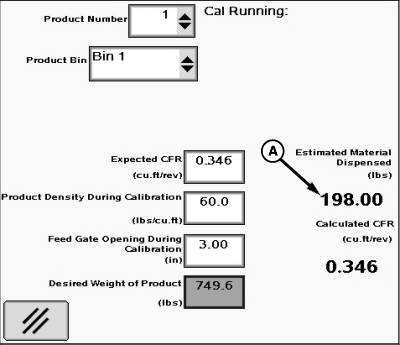
N78484-UN-22OCT07A - Estimated Weight
Position suitable container to capture product dispensed from conveyor belt. -
 CAUTION: Prevent personal injury from spinning blades. Verify
that spinner PWM valve is disconnected electrically to prevent unexpected
spinner blade movement while catching product dispensed during calibration
procedure.
CAUTION: Prevent personal injury from spinning blades. Verify
that spinner PWM valve is disconnected electrically to prevent unexpected
spinner blade movement while catching product dispensed during calibration
procedure.NOTE: SOLUTION PUMP ENGAGE switch is used as SPINNER ENABLE switch when dry spreader is installed. MASTER ON switch on multifunction control handle is used for CONVEYOR BELT START switch.
Turn on Spinner Enable switch and Conveyor Belt Start switch. The belt starts turning and the “Cal Running” screen appears. The estimated weight (A) of material dispensed by the belt is displayed and updated as more material is dispensed.
-
Calibration stops when estimated material dispensed is equal to desired weight of product to dispense. Operator can stop calibration procedure at any time by turning off the spreader. Calibration resumes when operator turns spreader back on.
-
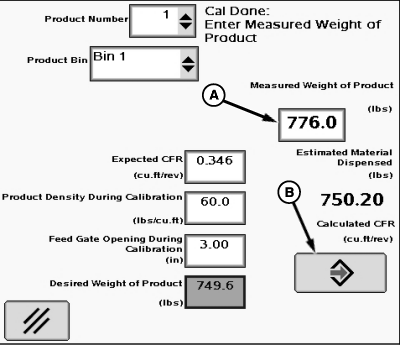
When calibration is done, display indicates “Cal Done: Enter Measured Weight of Product”.
-
N78485-UN-22OCT07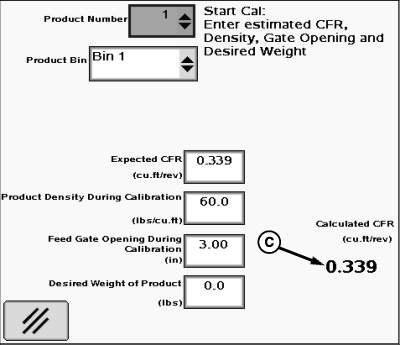
N78486-UN-22OCT07A - Input Box
B - Enter Button
C - Calibrated CFR Value
Weigh the product dispensed. Select input box (A) and input the measured weight of product dispensed using the numeric key pad that appears. -
Press “Enter” button (B). Spreadstar generates and displays the Calculated CFR (C). This value is stored for the product or a value can be entered to override the Calculated CFR.
-
The accuracy of the Calibrated CFR can be checked by running the calibration procedure again, this time using the Calculated CFR as the Expected CFR. If the Calculated CFR is correct, the “Desired Weight of Product” to dispense entered closely matches the measured weight of product when the procedure is run.
-
Connect previously disconnected electrical connector to spinner PWM valve.
|
1 Based on 1.0 cm feed gate opening
|
OUO6092,0000958-19-20150310 |