Control Unit Info
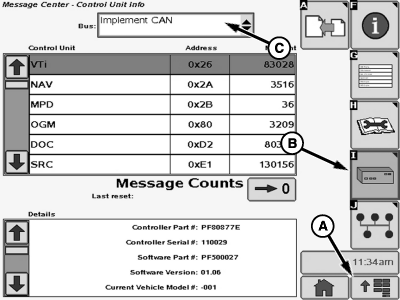
N74942-UN-31JAN07
A - Menu Button
B - Electronic Control Unit Info Softkey
C - Drop-down Menu
This function is used by the factory in order to help with diagnosing the system.
-
Select Menu Button (A).
-
Select Message Center Button from the application menu.
-
Select Electronic Control Unit Info Softkey (B).
-
Select Vehicle CAN from drop-down menu (C) to access CAN Bus information for the Vehicle controllers, or select Implement CAN from the drop-down menu (C) to access CAN Bus information for the Implement/AMS controllers.
|
OUO6092,0000DA0-19-20070507 |