DISPLAY softkey
PC8841-UN-30OCT05
Display - Main
When display is initially installed in a vehicle, it will have a default setting for all features. Operators have the ability to change these settings to fit their needs. Once these settings are changed, they will be saved and retained through each power cycle.

PC8663-UN-29APR15
MENU button
PC8654-UN-05AUG05
DISPLAY button

PC8689-UN-09AUG05
DISPLAY softkey
Go to MENU >> DISPLAY button >> DISPLAY softkey

PC8684-UN-09AUG05
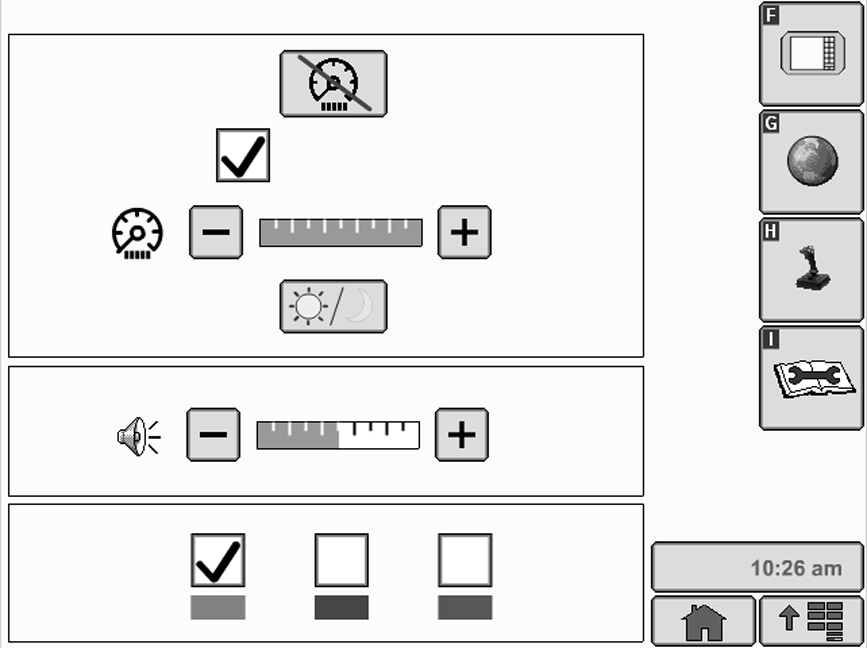
PANEL DIM button
PANEL DIM button allows operator to quickly darken screen with one button push. When the operator engages the panel dim feature the screen temporarily darkens in order to reduce glare. Screen will resume normal brightness when an alarm condition exists or when operator touches screen.

PC8685-UN-09AUG05
BRIGHTNESS button
NOTE: To exit Panel Dim, press any button on display control.
BRIGHTNESS button can be changed by selecting PLUS or MINUS button.

PC8686-UN-09AUG05
Sync With Cab Check box
NOTE: Sync with Cab feature only functions on selected vehicles.
Sync with Cab check box , when activated, allows display to control all lights within vehicle cab. Deselecting check box will allow only display to lighting to change with no effect on other cab displays and lights.

PC8693-UN-09AUG05
DAYLIGHT/NIGHTLIGHT button
DAYLIGHT/NIGHTLIGHT button allows operator to quickly change screen with one button push. control.

PC8687-UN-09AUG05
VOLUME button
Volume can be changed by selecting either + or - button.
PC8686-UN-09AUG05
Highlight/Focus Color
NOTE: Highlight color is defaulted to red at initial power-up of display.
Highlight/Focus Color can be changed by selecting desired color (red, blue, green).
|
OUO6092,00010D5-19-20081113 |