Vision Sensor Calibration Procedure
Calibration is recommended to improve performance for changes in the following:
- Crop height, if varying more than 305 mm (12 in)
- Crop type
- Crop color
- Soil color
- Crop residue
- Weedy conditions
- Tread setting, front and rear axles must be equal
- Camera Mounting
-
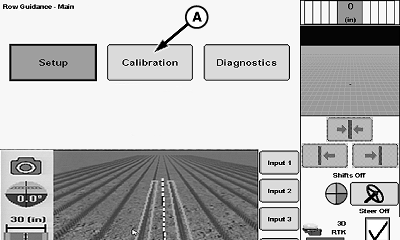
N116932-UN-11FEB16Calibration Button
A - Calibration Button
Select calibration button (A). -
NOTE:
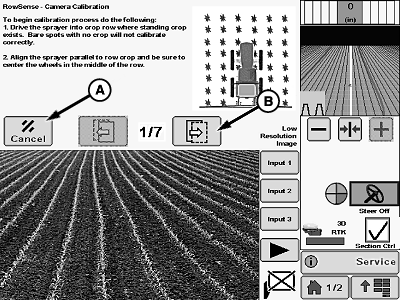
N116950-UN-22JUL16A - Cancel Button
B - Next Button
Press the cancel button (A) at any time during calibration to end the procedure. Calibration value is not saved if cancel button is pressed.If crop rows are not well defined, heavily weeded or large skips are present in rows then system calibration will not be correct or may be unsuccessful. Position machine to avoid these conditions before beginning calibration for best results.
Image displayed during calibration is low resolution. The display cannot support high definition images from the vision sensor. This is normal system operation.
Align machine with wheels in the center of crop rows. Press next button (B).
-
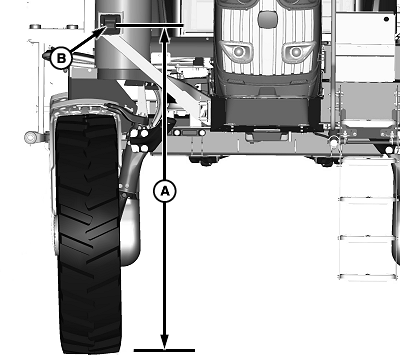
N137020-UN-20APR18A - Camera Height Distance
B - Camera Window
Measure distance (A) from bottom of camera window (B) to the ground. -
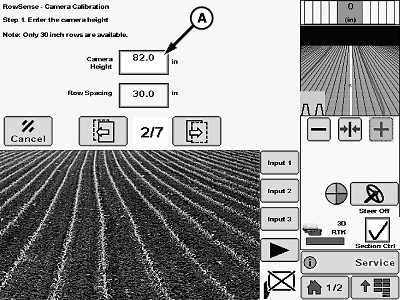
N137021-UN-20APR18A - Camera Height Input Box
Select camera height input box (A) and enter previously measured camera height. -
Press next button.
-
Wait for the system to perform calibration procedure.
-
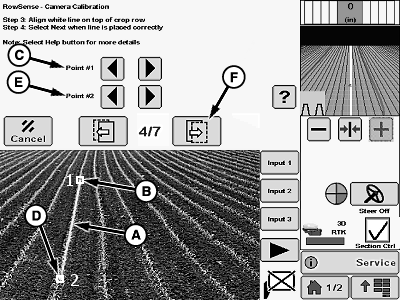
N117252-UN-22SEP15A - White Line
B - Point 1
C - Point 1 Adjustment Button
D - Point 2
E - Point 2 Adjustment Button
F - Next Button
Check white line (A) for accurate row location. -
If white line is not centered on the crop row perform the following:
-
Adjust point 1 (B) to center of row using point 1 adjustment buttons (C).
-
Adjust point 2 (D) to center of row using point 2 adjustment buttons (E).
-
-
Press next button (F) when white line is centered on the crop row.
-
Wait for calibration process to be completed.
-
NOTE: Machine must be moving forward during process (not reverse) to avoid calibration failure.
Drive down the center of the crop row in a very straight section of the crop for 30 m (100 ft) to complete calibration.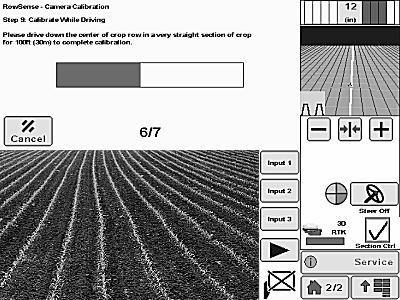
N119912-UN-22SEP15 -
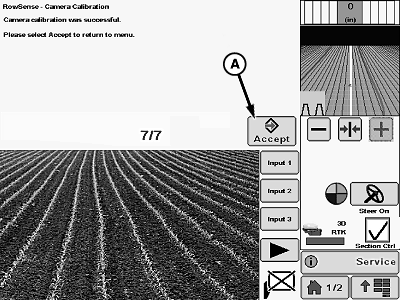
N117253-UN-22SEP15A - Accept Button
Press the accept button (A) to confirm and save the calibration.NOTE: If calibration fails, press the accept button to return to the main menu. Verify that machine is properly aligned with rows, that wheels are in the center of crop rows, and that rows are well defined with no skips. Repeat calibration procedure.
Refer to the Troubleshooting Guide for more information about causes for calibration failures.
|
BN55050,00001A5-19-20180517 |