AutoTrac™ RowSense™ Setup
After the display has been configured set up AutoTrac™ RowSense™.
-
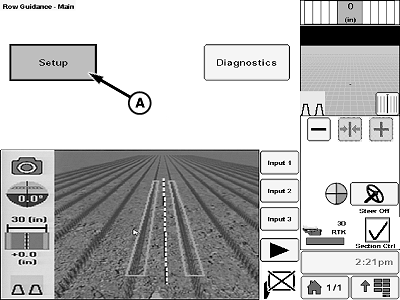
N117964-UN-11FEB16A - Setup Button
Select setup button (A). -
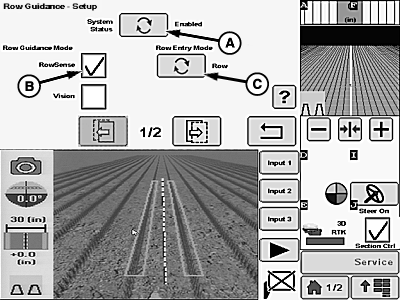
N137022-UN-20APR18A - System Status Button
B - Rowsense™ Check Box
C - Row Entry Mode Button
Press the system status button (A) to enable/disable RowSense™ guidance system. -
Select RowSense™ check box (B).
-
Press the row entry mode button (C) to choose between the following:
- Manual Steer: When AutoTrac™ resume button is pressed the system automatically switches to sensor guidance whenever crop is detected. The system switches to Global Positioning System (GPS) only guidance whenever crop is not detected. This mode is used when GPS guidance was not used during planting or rows are not straight.
- GPS Steer: When AutoTrac™ resume button is pressed the system begins in GPS only guidance. When AutoTrac™ resume button is pressed a second time, the system utilizes sensor guidance when possible. When crop is not detected or sensor guidance cannot be achieved, the system automatically switches to GPS only guidance. Use this entry mode ONLY when rows were GPS planted.
NOTE: The entire machine MUST BE completely out of the headlands before engaging AutoTrac™ RowSense™. Machine must be well aligned with and operating in the desired crop rows before engaging the system. Poor performance occurs if these conditions are not met.
-
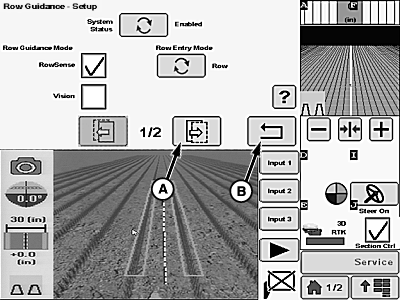
N137023-UN-20APR18A - Next Button
B - Return Button
Press next button (A) to proceed to next setup page. -
Press return button (B) to go back to previous page.
|
AutoTrac is a trademark of Deere & Company RowSense is a trademark of Deere & Company |
BN55050,00001A7-19-20180420 |