Engine Information Screen
N119813-UN-09SEP15
Home Page Screen
N110069-UN-05FEB14
Engine Information Screen
N109913-UN-28JAN14
Service Regeneration Mode Screen
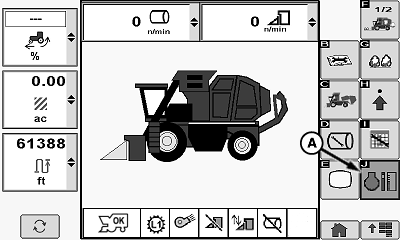
A - Engine Information Button
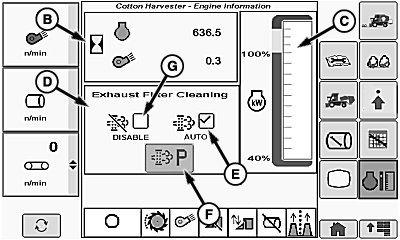
B - Engine and Fan Hours
C - Engine Power Meter
D - Exhaust Filter Cleaning Modes
E - AUTO Mode Icon
F - Parked Regeneration Mode Icon
G - Disable Icon
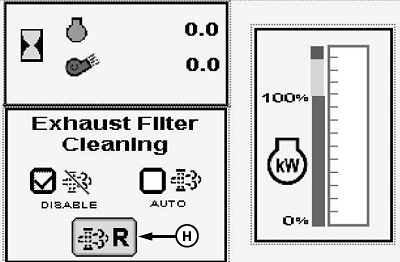
H - Service Regeneration Required Icon
To access engine information screen, select engine information button (A) on home screen menu.
The following information is shown on the engine information screen:
- Engine and fan hours (B)
- Engine power meter (C)
- Exhaust filter cleaning modes (D)
- Service regeneration required icon (H)
Engine and Fan Hours
Cumulative operating hours for the engine and the cotton fans is displayed.
Engine Power Meter
Current engine operating power level is displayed.
Exhaust Filter Cleaning Modes
NOTE: For more information on exhaust filter cleaning, see Operating the Machine section.
Three exhaust filter cleaning modes are available:
- Automatic (AUTO) regeneration
- Parked regeneration
- Disabled
-
Automatic regeneration mode. Select AUTO mode icon (E) for normal operation. In this mode the system performs an active regeneration of the exhaust filter while harvesting continues. This mode requires minimal operator interaction.
-
NOTE: The parked exhaust filter regeneration mode icon is active only when exhaust filter restriction reaches a predetermined level. When not active, the icon is grayed out.
Parked regeneration mode. When the parked regeneration mode icon (F) is selected, the system initiates an automatic sequence of events to clean the exhaust filter. The system controls engine speed during this cleaning mode and the machine must remain parked until cleaning is complete. The time required for this sequence varies and can exceed 40 minutes.
-
IMPORTANT: Disable mode MUST BE USED when machine is temporarily connected to an indoor ducted exhaust system for diagnostic and repair activities.
NOTE: Regeneration mode resets to auto when key switch is cycled.
Disable regeneration mode. Select disable icon (G) to disable the exhaust filter cleaning system when machine is in an area where it is unsafe to operate with elevated exhaust temperatures.
-
Service Regeneration Mode. When icon (H) appears, a service regeneration is required. See your John Deere Dealer for service.
|
DP99999,00009D0-19-20150909 |