Calibration Screens
N107503-UN-06NOV13
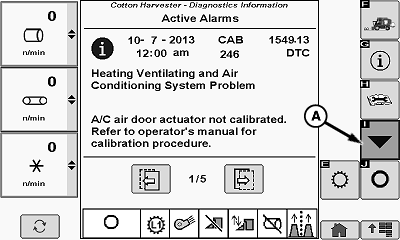
Active Alarms Main Screen
N102620-UN-08APR14
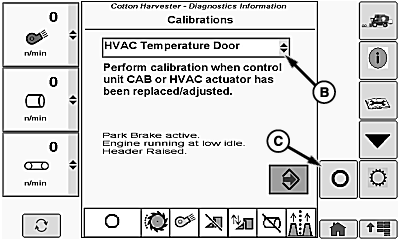
Calibration Main Screen
A - Calibration Button
B - Subsystem Drop-down Box
C - Menu Off Button
The calibration main screen provides a drop-down menu to select the machine subsystem that requires calibration. Calibration procedures are available for the following subsystems.
- HVAC Temperature Door
- HVAC Temperature Switch
- HVAC Fan Switch
- Unit Drive System
- RMB Motors
- Header Height System
- RMB Rockshaft
- RMB Gate and Handler Valves
- Multi-function Lever
- Transmission Solenoids
- Transmission Pump
- Transmission Front Motor
- Transmission System
- Transmission Steer Angle
- Row Guidance Steering
- Row Guidance Crop Sensor
Once a subsystem is selected from the drop-down list, a series of screens listing detailed calibration or adjustment procedures can be accessed. These procedures are not intended for use on a routine basis but are necessary following repair or replacement of components in the respective subsystems.
Access the desired calibration procedure as follows:
-
Select diagnostics information menu button on the home page. Active alarms main screen appears on display.
-
Select calibration button (A) on active alarms screen menu. Calibration main screen appears.
-
Select subsystem drop-down box (B) on calibration main screen. Subsystem drop-down list appears.
-
NOTE: Menu off button (C) is required to perform some calibrations. Follow on-screen instructions when performing calibrations.
Select desired subsystem on drop-down list. The opening page of the calibration routine appears on the screen. Prerequisites to starting the procedure are listed on the opening page.
-
After any prerequisites have been met, select the enter button on the screen to activate the procedure. Follow the instructions on the interactive screens until the calibration is complete.
|
DP99999,00009D4-19-20150909 |