Parked Exhaust Filter Cleaning
N107351-UN-04OCT13
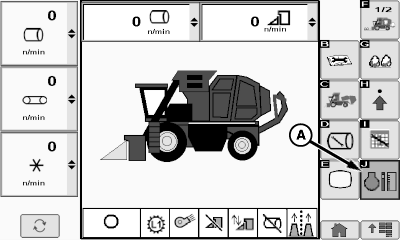
Home Page Screen
N110074-UN-05FEB14
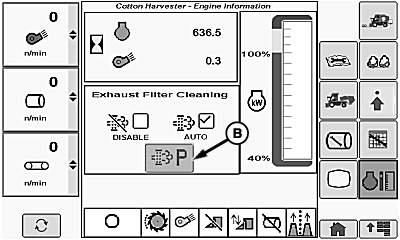
Engine Information Screen
N104255-UN-04JUN13
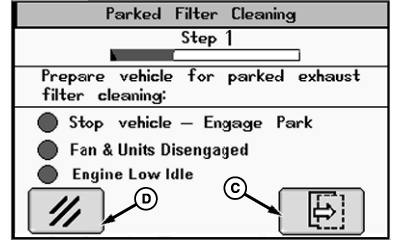
Filter Cleaning Status Screen 1
N104256-UN-04JUN13
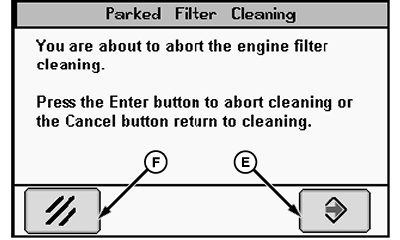
Filter Cleaning Cancellation Screen
A - Engine Information Button
B - Parked Exhaust Filter Cleaning Icon
C - Next Page Icon
D - Cancel Icon
E - Enter Icon
F - Cancel Icon
When exhaust filter restriction reaches a preset level, the engine control unit (ECU) generates a diagnostic trouble code (DTC) and enables the parked exhaust filter cleaning mode. A pop-up message on the CommandCenter™ display informs the operator that a parked filter cleaning cycle is required. The operator must initiate this process. During the parked cleaning process, the ECU controls engine speed. The machine must remain parked during the procedure.The time required to perform a parked exhaust filter cleaning cycle is dependent upon the level of exhaust filter restriction, ambient temperature, and current exhaust gas temperature. Cleaning cycle time can exceed 40 minutes.
Initiate parked exhaust filter cleaning process as follows:
-
 CAUTION: Engine operates with elevated exhaust temperature for
an extended period during exhaust filter cleaning. Exhaust gases and
filter reach temperatures hot enough to burn people and melt or ignite
common materials.
CAUTION: Engine operates with elevated exhaust temperature for
an extended period during exhaust filter cleaning. Exhaust gases and
filter reach temperatures hot enough to burn people and melt or ignite
common materials.Park machine in an outdoor area away from combustible materials where it is safe to operate machine with elevated exhaust temperatures.
-
Move multi-function lever to neutral.
-
Press park brake button to engage park brake in manual mode.
-
Press low engine speed button.
-
Place row units switch and fan switch in OFF position.
-
Select engine information button (A) on home page menu on display. Engine information screen appears on display.
-
Select parked exhaust filter cleaning icon (B). Filter cleaning status screen 1 appears on display.
-
Verify that machine has been prepared for the cleaning process. Select next page icon (C) to start cleaning process. Filter cleaning status screen 2 appears on display.
-
If necessary, select cancel icon (D) to cancel process. A cancellation screen appears on display. Select enter icon (E) to abort the cleaning process. Select cancel icon (F) to return to cleaning process.
N104257-UN-04JUN13
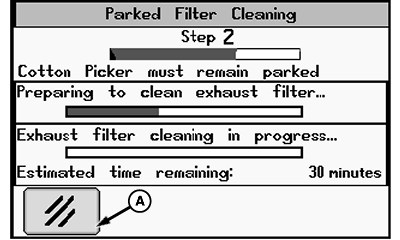
Filter Cleaning Status Screen 2
N104258-UN-04JUN13
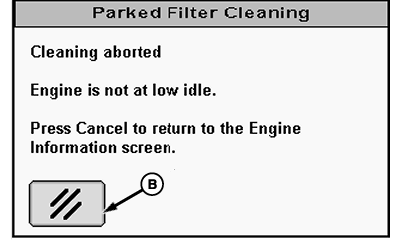
Cleaning Process Abort Message Screen
N104259-UN-05JUN13
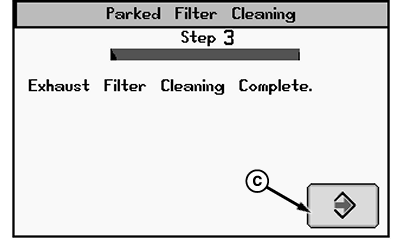
Cleaning Process Complete Message Screen
A - Cancel Icon
B - Cancel Icon
C - Enter Icon
There are two steps in the parked filter cleaning process, preparation and cleaning. During the preparation step, the engine control unit (ECU) controls engine speed to increase exhaust temperature. During the cleaning step, the cleaning system cleans diesel particulates or soot from the exhaust filter. The ECU updates progress bars and the time remaining display on filter cleaning status screen 2.
NOTE: At any time during the parked cleaning procedure, the process can be canceled by advancing the throttle, engaging transmission, stopping engine, or selecting cancel icon (A).
While cleaning is in progress, the ECU monitors safety and operational interlock parameters. If any of the conditions are not satisfied, the ECU aborts the cleaning process and a message screen appears on display. The message screen states that the process was aborted and which interlock check failed. When this message screen appears, select the cancel icon (B) to return to engine information screen.
When the parked exhaust filter cleaning process is complete, a message screen appears on display. If not returning the machine to service immediately after procedure, allow engine to run until coolant temperature returns to normal before stopping engine. Select enter icon (C) to return to engine information screen.
System retains the last selected cleaning mode. When cleaning is complete, select AUTO mode, unless in conditions where it is unsafe. See WHEN TO DISABLE EXHAUST FILTER CLEANING SYSTEM in this section.
|
DP99999,00009E9-19-20140909 |