Spray Setup Page
Navigate to Spray Setup Page

BM011351-UN-29MAR17
Menu Button → Sprayer Application Button → Setup Menu Softkey → Spray Setup Tab
-
Select the Menu button.
-
Select the Sprayer Application button.
-
Select the Setup Menu softkey.
-
Select the Spray Setup tab.
Spray Setup Page
BM017145-UN-17NOV16
Spray Setup Page
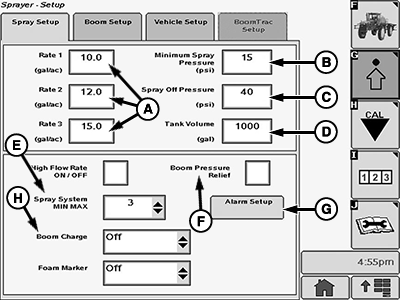
A - Application Rates
B - Minimum Pressure
C - Spray Off Pressure
D - Tank Volume
E - Spray System MIN MAX
F - Boom Pressure Relief
G - Alarm Setup
H - Boom Charge
The following settings are displayed and can be changed:
- Application Rates 1, 2, or 3 (A): Allows the operator to set three different target application rates. The preset application rates are displayed at the Sprayer Main Page when one of the application rates 1, 2, or 3 are selected at the rate select switch.
- Minimum Pressure (B): Allows the operator to set a minimum pressure to be maintained while spraying.
- Spray Off Pressure (C): Allows the operator to set the pressure to be maintained while not spraying. Typically used to maintain high-pressure setting for agitation when not spraying. It should not be used as a means for spray boom charge compensation.
- Tank Volume (D): Allows the operator to set the solution tank volume.
- Spray System MIN MAX (E): Allows the operator to adjust the response time of the SprayStar™ rate control.
- Boom Charge (H): Allows the operator to charge the spray boom at an automatically calculated pressure (spray boom charge pressure) for 3 s after the master on-off switch is pressed ON.
- Boom Pressure Relief (F): Allows the operator to activate the spray boom pressure relief feature.
- Alarm Setup (G): Allows the operator to turn on or off a flow rate error, sections off and ladder alarms.
|
SprayStar is a trademark of Deere & Company |
DV15698,00001AF-19-20170406 |