Set Tank Volume
Each time the tank volume (C) is selected, solution tank volume can be reset to current default tank volume or set to any other value above 0. See the Specifications Section to refer to solution tank volume.
-
Select the Menu button.
-
Select the Sprayer Application button.
-
Select the Setup Menu softkey (A).

BM011351-UN-29MAR17Menu Button → Sprayer Application Button → Setup Menu Softkey → Spray Setup Tab
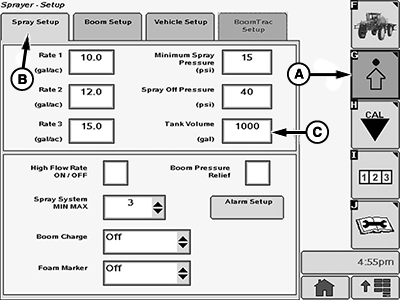
BM017149-UN-17NOV16Spray Setup Page
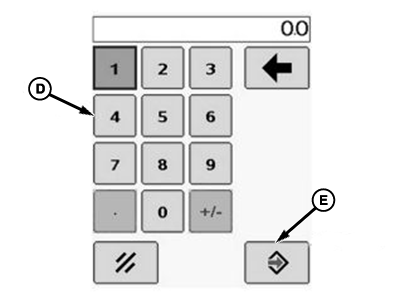
BM002466-UN-24SEP15Popup Keypad
A - Setup Menu Softkey
B - Spray Setup Tab
C - Input box
-
Select the Spray Setup tab (B).
-
Select the tank volume input box (C).
-
Enter a new value using the popup keypad (D).
-
Select the Accept button (E) to accept the new value.
|
DV15698,00001B0-19-20170404 |