Set Vehicle Speed Selection
-
Select the Menu button.

BM011351-UN-29MAR17Menu Button → Sprayer Application Button → Setup Menu Softkey → Vehicle Setup Tab
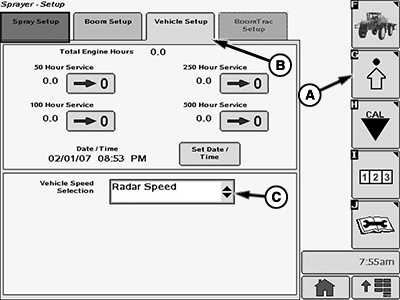
BM017159-UN-17NOV16Vehicle Setup Page
A - Setup Menu Softkey
B - Vehicle Setup Tab
C - Input Box
-
Select the Sprayer Application button.
-
Select the Setup Menu softkey (A).
-
Select the Vehicle Setup tab (B).
-
Select the input box (C).
-
Select one of the speed input options:
- Wheel Speed
- Radar Speed
- GPS Speed
NOTE: The selected speed is shown in one of the drop-down menus at the Spray Main Page.
|
DV15698,00001B1-19-20170404 |