Set Flowmeter Calibration Number
NOTE: The flowmeter is not recommended for boom flow rates under 15 L/min (4 gal/min).
-
Select the Menu button.

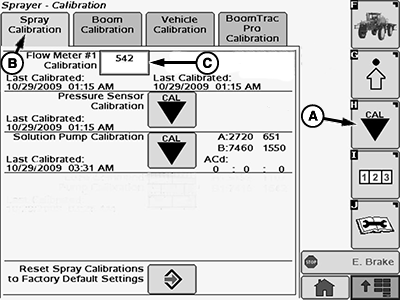
BM011363-UN-31MAR17Menu Button → Sprayer Application Button → Calibration Menu Softkey → Spray Calibration Tab
BM017160-UN-17NOV16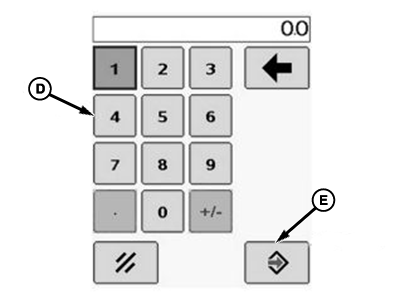
BM002466-UN-24SEP15Popup Keypad
A - Calibration Softkey
B - Spray Calibration Tab
C - Input Box
D - Popup Keypad
E - Accept Button
-
Select the Sprayer Application button.
-
Select the Calibration Menu softkey (A).
-
Select the Spray Calibration tab (B).
-
Select the input box (C).
-
Enter the new value using the popup keypad (D).
NOTE: The calibration number for the flowmeter is stamped on the metal serial number tag attached to the back of the GreenStar™ display. An extra tag is attached to the nut of the flowmeter.
-
Select the Accept button (E).
|
GreenStar is a trademark of Deere & Company |
DV15698,00001B2-19-20170403 |