Set Spray Response
The spray response allows the operator to adjust the response time of the SprayStar™ rate control. This is the time it takes the true application rate to reach the target application rate in auto mode.
The response time has five different settings. A 5 indicates the fastest response time and a 1 indicates the slowest response time. Greater the setting, less is the required time to adjust to the target rate.
When to Change the Response Time Setting
- When the target application rate is never reached, increase the response time
- When the application rate is erratic, decrease the response time
- When the time it takes for the true application rate to reach the target rate is longer than 4 s, increase the response time
Response Time Setting
-
Select the Menu button.
-
Select the Sprayer Application button.
-
Select the Setup Menu softkey (A).

BM011351-UN-29MAR17Menu Button → Sprayer Application Button → Setup Menu Softkey → Spray Setup Tab
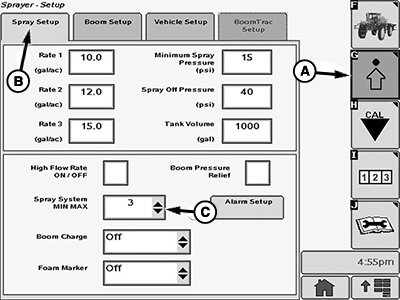
BM017150-UN-17NOV16Spray Setup Page
A - Setup Menu Softkey
B - Spray Setup Tab
C - Input Box
-
Select the Spray Setup tab (B).
-
Select the input box (C).
-
Select the new value from the drop-down list.
NOTE: To choose the correct setting, start with the response time setting of 4. If this response time does not provide acceptable performance, use a lower value.
|
SprayStar is a trademark of Deere & Company |
FC59002,0000004-19-20170404 |