Set Boom Charge
Spray Boom Charge Feature
The boom charge feature pressurizes the spray boom to a preset value or a system calculated pressure for the first 3 s after the spray system master switch (A) is on. This pressurization compresses the air that may be into the spray boom to ensure that the nozzles are spraying at the target rate as soon as possible.
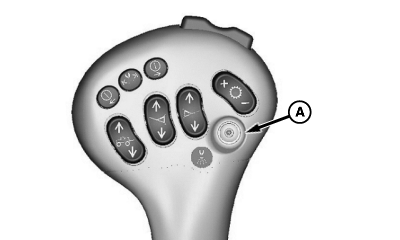
N66488-UN-15SEP04
A - Spray System Master On-Off Switch
- Off: Spray boom charge feature is disabled. The system returns to the same rate as at the last time the spray system master switch (A) was switched off.
-
Manual: System charge the spray boom
to the pressure programmed for the manual mode of the rate select
switch (see Set Manual Pressure in this Section). The system charges
the spray boom for 3 s after the spray system master switch (A) is
switched on, then the automatic rate control system takes over.
NOTE: This may cause over or under application if the manual
target pressure is not equal to the spray speed after the headland
turns.
-
Auto: System charges the spray boom
to an automatically predetermined pressure and flow calculated by
the control unit based on the parameters of the sprayer when the spray
system master switch (A) is switched off. This mode allows the spray
rate control system to reach the target application rate faster when
smaller flow rate nozzles are used. It is also best to operate in
this mode when using the Swath Control Pro™. Use this mode
when the solution flow rate is less than 100 L/min (26 gal/min). Check
if both spray off pressure and minimum spray pressure are set to complement
the operating pressure (See Set Spray Off Pressure and Set Minimum
Pressure in this Section).
NOTE: Minimum spray pressure should never be in the operating
range of the target application rate pressure you are spraying.
There are three selectable modes:
Determining Solution Flow Rate
-
When spraying, select the flow rate indicator from one of the
drop-down menus at the Sprayer Main Page.
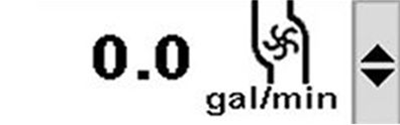
BM011385-UN-04APR17Sprayer Main Page Drop-down Menu—Flow Rate Indicator
- Multiply the nozzle flow rate (gal/min) at the operating pressure by the total number of nozzles on the spray boom. Example: If 8003 type nozzles at 40 psi are installed and there are 54 nozzles on the spray boom: 0.3 gal/min x 54 = 16.2 gal/min (solution flow rate).
Spray Boom Charge Setting
-
Select the Menu button.
-
Select the Sprayer Application button.
-
Select the Setup Menu softkey (A).

BM011351-UN-29MAR17Menu Button → Sprayer Application Button → Setup Menu Softkey → Spray Setup Tab
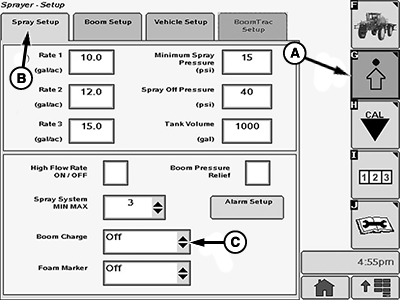
BM017151-UN-17NOV16Spray Setup Page
A - Setup Menu Softkey
B - Spray Setup Tab
C - Input Box
-
Select the Spray Setup tab (B).
-
Select the input box (C).
-
Select one mode from the drop-down list.
NOTE: The response time of the solution system is calculated after each time the engine has been started. Make the first spray pass at a constant speed, with all spray boom sections turned on and the correct nozzle size for the target rate selected. Changing speed or shutting off the spray boom sections during the first spray pass can result in invalid values and incorrect boom charge that cause application rate issues. If necessary, reset the values by restarting the engine and making another spray pass. The response values of the solution system need to be reset each time the nozzle size is changed.
|
Swath Control Pro is a trademark of Deere & Company |
FC59002,0000005-19-20170404 |