Total Engine Hours
NOTE: Engine hours are only displayed on the SprayStar™ display and are not lost during loss of power to the SprayStar™ computer. Changing display monitors do not lose the engine hours.
To find the total engine hours of the sprayer:
-
Turn the ignition key to run position.
-
Select the Menu button.

BM011351-UN-29MAR17Menu Button → Sprayer Application Button → Setup Menu Softkey → Vehicle Setup Tab
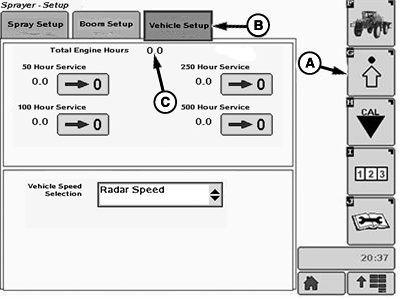
BM017157-UN-17NOV16Vehicle Setup Page
A - Setup Menu Softkey
B - Vehicle Setup Tab
C - Total Engine Hours
-
Select the Sprayer Application button.
-
Select the Setup Menu softkey (A).
-
Select the Vehicle Setup tab (B).
-
Total engine hours are displayed at the location (C). The total engine hours can also be displayed at the Spray Main Page, in one of the drop-down menus.
|
SprayStar is a trademark of Deere & Company |
FC59002,0000009-19-20170404 |