Reset Service Interval Hour Meter
Service interval statements appear on the bottom of the Sprayer Main Page after a service interval has expired. The service interval statement informs the operator that the time has expired since the last service was performed. The service intervals that the SprayStar™ monitors are 50, 100, 250, and 500 hours.
When a service interval statement appears on bottom of Sprayer Main Page, perform the service as soon as possible and then reset the service interval hour meter.
To reset a service interval hour meter:
-
Turn the ignition key to run position.
-
Select the Menu button.

BM011351-UN-29MAR17Menu Button → Sprayer Application Button → Setup Menu Softkey → Vehicle Setup Tab
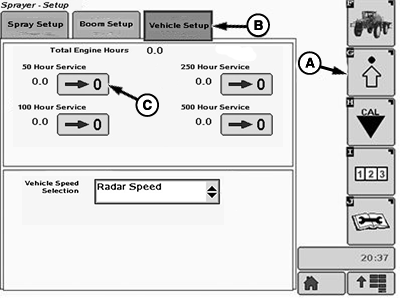
BM017158-UN-17NOV16Vehicle Setup Page
A - Setup Menu Softkey
B - Vehicle Setup Tab
C - Reset Button
-
Select the Sprayer Application button.
-
Select the Setup Menu softkey (A).
-
Select the Vehicle Setup tab (B).
-
When a service interval has been reached and it has been completed, select the correspondent reset button (C). The specific hour meter for that service interval is reset and starts to count from 0.
NOTE: See Maintenance and Service Intervals Section for items to be serviced and their service intervals.
NOTE: SprayStar™ does not produce a service interval statement on the Sprayer Main page until a service interval expires.
|
SprayStar is a trademark of Deere & Company |
FC59002,000000A-19-20170404 |