Calibrate Wheel Speed Sensor
-
Fill the solution tank half full of water or solution.
-
Measure a 122 m (400 ft) course on flat terrain that is most typical of field conditions (loose, medium, hard-packed). Do not use end rows due to possible varying ground conditions that can affect the calibration.
-
Mark both the beginning and end of the travel with markers that are visible from the cab.
-
Leave an extra distance at the beginning and at the end of the travel for the sprayer to accelerate to a constant speed.
-
Set the vehicle speed to wheel speed in Vehicle Setup tab. (See Set Vehicle Speed in this Section).
-
Select the Menu button.

BM011363-UN-31MAR17Menu Button → Sprayer Application Button → Calibration Menu Softkey → Vehicle Calibration Tab
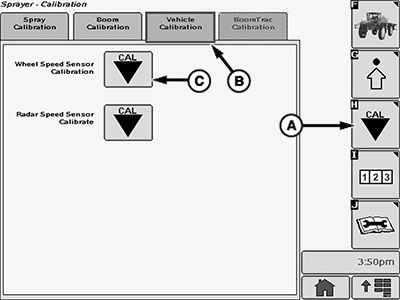
BM017164-UN-17NOV16Vehicle Calibration Page
A - Calibration Menu Softkey
B - Vehicle Calibration Tab
C - Wheel Speed Sensor Calibration Button
-
Select the Sprayer Application button.
-
Select the Calibration Menu softkey (A).
-
Select the Vehicle Calibration tab (B).
-
Select the Wheel Speed Sensor Calibration button (C).
-
Follow all instructions shown on the first screen:
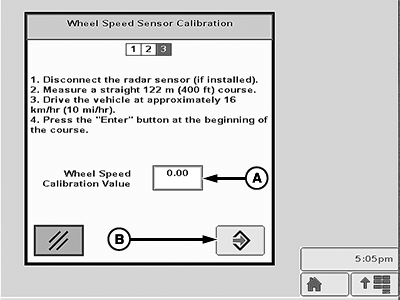
BM011386-UN-04APR17Wheel Speed Sensor Calibration—Page 1
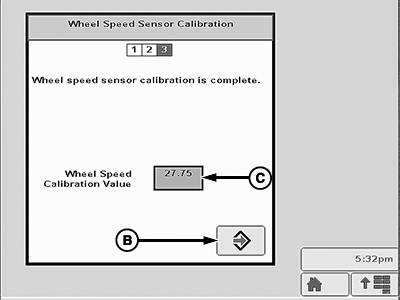
BM011388-UN-04APR17Wheel Speed Sensor Calibration—Page 3
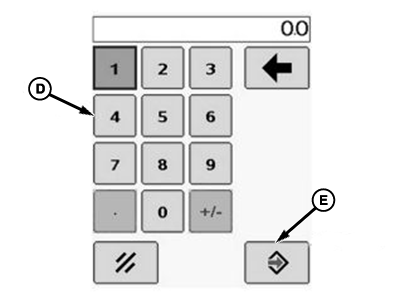
BM002466-UN-24SEP15Popup Keypad
A - Wheel Speed Calibration Value Input Box
B - Enter Button
C - Wheel Speed Sensor Calibration Value
D - Popup Keypad
E - Accept Button
-
Start driving somewhere before the start mark until reaching the specified speed shown on the screen.
-
While maintaining that speed, drive to the start mark.
-
When reach the start mark, select the Enter button (B).
-
Drive in a straight line to the end mark. Keep a constant speed during the travel.
-
-
When reach the end mark, select the Enter button (B) on the second screen.
-
Record the wheel speed calibration value that appears inside the box (C) on the third screen.
-
Repeat the calibration procedure two more times and record all calibration values.
-
Calculate the average value of the three calibration values.
-
Select the Wheel Speed Sensor Calibration button.
-
Select wheel speed calibration value input box (A).
-
Enter the calculated average value using the popup keypad (D).
-
Select the Accept button (E) to accept the new value.
-
To check the calibration value:
-
Drive the sprayer and stop on the start mark.
-
Reset the distance counter. (See Reset Distance Counter in this Section.)
-
Drive to the end mark.
-
Check the measured value on the distance counter. If the distance is out of 120—123 m (395—405 ft), proceed as follows:
- Multiply the wheel speed sensor calibration value by the recorded distance on the distance counter.
- Divide the result by 122 m (400 ft).
- Enter the result in the wheel speed sensor calibration input box.
NOTE: Calibration value ranges:
- Standard/Narrow Tires: 48—58
- Flotation Tires: 48—58
NOTE: If radar was disconnected, connect after completing calibration of wheel speed sensor.
-
|
FC59002,000000B-19-20170404 |