Set Minimum Pressure
Minimum Pressure Setting
Determine and set the minimum pressure required using the following procedures:
-
Unfold the spray booms.
-
Turn on all the spray control switches for each spray boom section.
-
Navigate to Spray Setup tab (B).

BM011351-UN-29MAR17Menu Button → Sprayer Application Button → Setup Menu Softkey → Spray Setup Tab

BM002465-UN-30MAR17Sprayer Setup Page
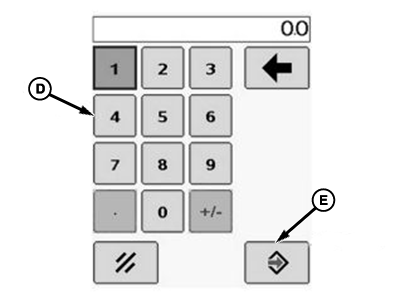
BM002466-UN-24SEP15Popup Keypad
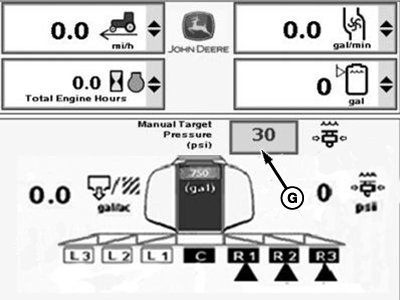
BM002467-UN-06JAN17Sprayer Main Page
A - Sprayer Main Softkey
B - Spray Setup Tab
C - Minimum Spray Pressure Input Box
D - Popup Keypad
E - Accept Button
F - Spray Off Pressure Input Box
G - Manual Target Pressure Input Box
-
Select the minimum spray pressure input box (C).
-
Enter 0 using the popup keypad (D).
-
Select the Accept button (E) to accept the new value.
-
Turn the rate control switch to the manual pressure setting (MAN position).
-
Select the spray off pressure input box (F).
-
Enter 0 using the popup keypad (D).
-
Select the Accept button (E) to accept the new value.
-
Turn on the solution pump and spray system master switch.
-
Select the Sprayer Main softkey (A).
-
Select the manual target pressure input box (G).
-
Add increments of 6.9 kPa (0.069 bar) (1 psi) until all nozzle body check valves open and all nozzles are spraying at full pattern. Note the pressure value when this occurs.
-
Select the minimum spray pressure input box (C).
-
Enter the noted pressure from previous step.
-
Select the Accept button (E) to accept the new value.
Spraying at Low Pressures
When spraying at low application pressures, use check valves with lower pressure settings for optimum performance. Using nozzle bodies with higher pressure check valves than the lowest targeted application pressure when driving slow can cause nozzles to shut off and therefore cause erratic application rates.
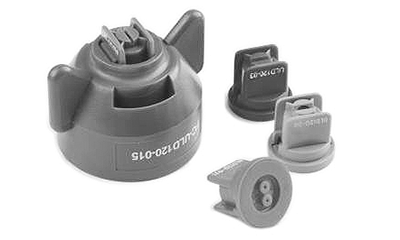
BM011352-UN-30MAR17
The spray rate control unit (SRC) attains the minimum pressure when the spray system master switch is on and in auto mode.
Pressure setting needs to be higher than the nozzle check valve pressure to keep all the check valves open, but not too high to prevent over-application during normal speed adjustments in the field. If minimum pressure is set too close to operating pressure, erratic operation and over-application can result.
NOTE: Viscosity of carrier may affect minimum pressure required. Perform procedure for carrier being applied. Review this procedure whenever changing nozzle sizes, types, or when nozzle check valves have been replaced.
Standard Factory Equipment
The spray boom has 83 kPa (0.83 bar) (12 psi) check valves as standard equipment. Other check valves available through SprayMaster™ parts include 21 kPa (0.21 bar) (3 psi), 69 kPa (0.69 bar) (10 psi), and 172 kPa (1.72 bar) (25 psi) settings. These pressures determine at what pressure nozzles shut off.
- 21 kPa (0.21 bar) (3 psi)—Yellow
- 69 kPa (0.69 bar) (10 psi)—Red
- 83 kPa (0.83 bar) (12 psi)—Green
- 172 kPa (1.72 bar) (25 psi)—Black
Check valve assembly (cap and spring) size and colors:
- EPDM
- Viton: Better resistance to more chemicals
Diaphragms:
|
SprayMaster is a trademark of Deere & Company |
FC59002,000007C-19-20170406 |