Set Number of Boom Sections
-
Select the Menu button.

BM011351-UN-29MAR17Menu Button → Sprayer Application Button → Setup Menu Softkey → Boom Setup Tab
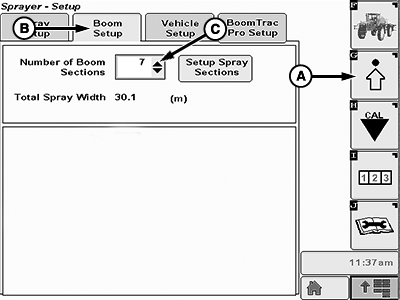
BM011356-UN-31MAR17Boom Setup Tab
A - Setup Menu Softkey
B - Boom Setup Tab
C - Input Box
-
Select the Sprayer Application button.
-
Select the Setup Menu softkey (A).
-
Select the Boom Setup tab (B).
-
Select the input box (C).
-
Select the number of sections from the drop-down list.
|
FC59002,0000085-19-20170404 |