Set Number of Nozzles, Nozzle Spacing, and Nozzle Spray Width for Band Spraying
The SprayStar™ spray boom sections setup is programmed differently for band spraying than for broadcast spraying.
-
Select the Menu button.

BM011351-UN-29MAR17Menu Button → Sprayer Application Button → Setup Menu Softkey → Boom Setup Tab
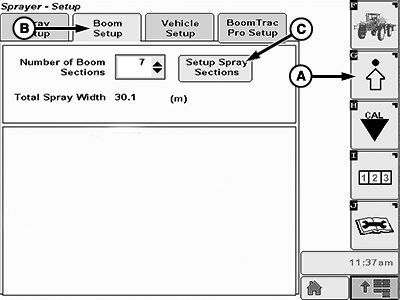
BM011357-UN-31MAR17Boom Setup Tab
A - Setup Menu Softkey
B - Boom Setup Tab
C - Setup Spray Sections Button
-
Select the Sprayer Application button.
-
Select the Setup Menu softkey (A).
-
Select the Boom Setup tab (B).
-
Select the Setup Spray Sections button (C). The setup spray sections page appears.
-
Select the spray section to change input box (A).
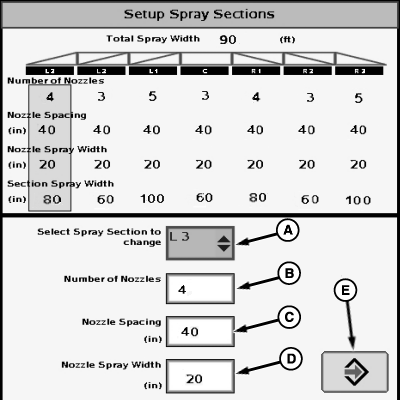
N120713-UN-09DEC15Setup Spray Sections Page
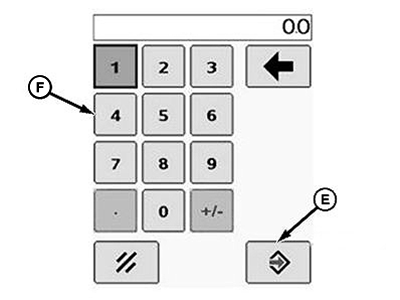
BM011358-UN-31MAR17Popup Keypad
A - Spray Section to Change Input Box
B - Number of Nozzles Input Box
C - Nozzle Spacing Input Box
D - Nozzle Spray Width Input Box
E - Accept Button
F - Popup Keypad
-
Select the spray boom section to be set in the drop-down list.
-
Select the number of nozzles input box (B).
-
Enter the crop rows the current spray boom section is banding using the popup keypad (F).
-
Select the Accept button (E) to accept the new value.
-
Select the nozzle spacing input box (C).
-
Enter the crop row width using the popup keypad (F).
-
Select the Accept button (E) to accept the new value.
-
Select the nozzle spray width input box (D).
-
Enter the band width using the popup keypad (F).
-
Select the Accept button (E) to accept the new value.
-
Repeat the procedure for each spray boom section.
NOTE: The section spray width and total spray width are automatically calculated according to the new settings.
NOTE: Make sure that the target application rate is for the banded area and not for the covered area.
NOTE: The acre counter on both Sprayer Main Page and in Job Summaries records covered acres and not banded acres.
The application rate in Job Summaries is calculated by the total volume applied divided by covered acres, NOT banded acres. When band spraying, the application rate in Job Summaries always is a percentage of the target rate.
To determine if the application rate in Job Summaries is correct, use the following equation:
- Job Summaries Application Rate = Target Application Rate x Band Width ÷ Row Width
|
SprayStar is a trademark of Deere & Company |
FC59002,0000086-19-20170404 |