Calibrate Solution Pump
The SprayStar™ system is automatically calibrate itself to provide an optimal control for a particular situation.
IMPORTANT: Do not perform this procedure for erratic solution pump rate or pressure if the A and B numbers are within range. If A and B numbers are within range, see entries for erratic rate or pressure in the Troubleshooting Section.
Only calibrate the solution pump when the A and B values do not lie within their ranges or when one of the following has been replaced:
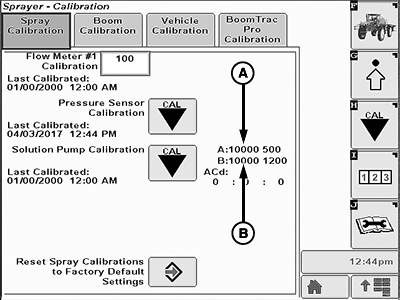
BM011368-UN-03APR17
Spray Calibration Page
A - A Value
B - B Value
- Solution pump/hydraulic motor assembly
- Proportional valve
- Hydraulic pump
- Spray rate control unit (SRC)
Correct ranges:
- A: 2200—3200
- B: 5000—6500
-
Turn off the solution pump switch.

BM011363-UN-31MAR17Menu Button → Sprayer Application Button → Calibration Menu Softkey → Spray Calibration Tab
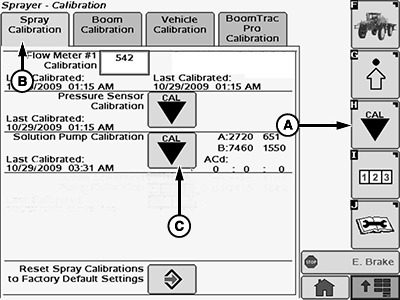
BM017162-UN-18NOV16Spray Calibration Page
A - Calibration Menu Softkey
B - Spray Calibration Tab
C - Solution Pump Calibration Button
-
Select the Menu button.
-
Select the Sprayer Application button.
-
Select the Calibration Menu softkey (A).
-
Select the Spray Calibration tab (B).
-
Select the Solution Pump Calibration button (C). Solution Pump Calibration page is displayed.
IMPORTANT: To avoid the solution pump from running dry, fill the solution tank with enough water or solution and warm up the hydraulic oil before calibrating the solution pump.
-
Follow all instructions shown on the first Solution Pump Calibration page.
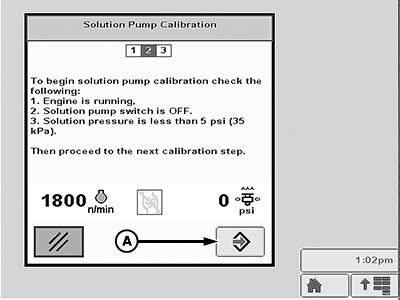
BM011369-UN-03APR17Solution Pump Calibration—Page 1
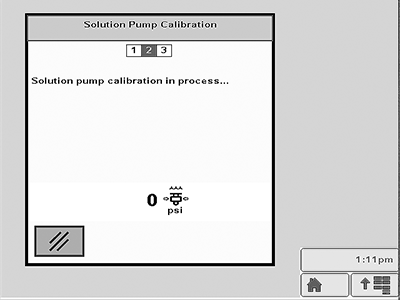
BM011370-UN-03APR17Solution Pump Calibration—Page 2
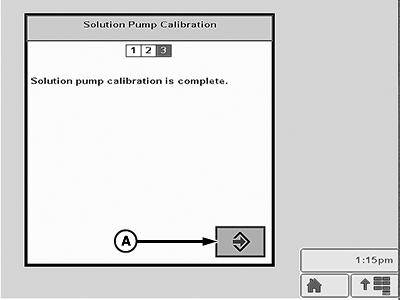
BM011371-UN-03APR17Solution Pump Calibration—Page 3
A - Enter Button
-
When finished, select the Enter button (A).
-
Wait for the calibration to be completed.
NOTE: The solution pump calibration takes approximately 1—2 min. The solution pump is turned off when the auto calibration is done.
-
Solution pump calibration is complete message is displayed. Select the Enter button (A).
|
SprayStar is a trademark of Deere & Company |
FC59002,000008C-19-20180507 |