Diagnostic Readings Page
Navigate to Diagnostic Readings Page
-
Select the Menu button.

BM011391-UN-05APR17Menu Button → Sprayer Application Button → Diagnostics Menu Softkey → Readings Tab
-
Select the Sprayer Application button.
-
Select the Diagnostics Menu softkey.
-
Select the Readings tab.
Diagnostic Readings Page
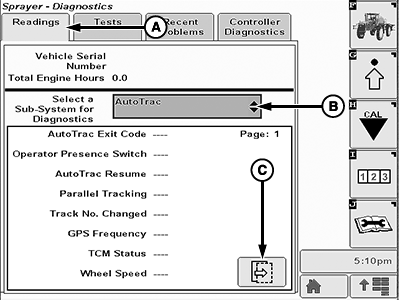
BM011392-UN-05APR17
Readings Page
A - Readings Tab
B - Sub-System for Diagnostics
C - Next Page Button
- Readings Tab (A): Shows the diagnostic readings for machine subsystems.
- Sub-System for Diagnostics (B): Allows the operator to select one subsystem for a diagnostic to be made.
- Next Page Button (C): Select to navigate between the pages of the subsystem diagnostic report.
|
FC59002,0000090-19-20170405 |