Refill Tank
To reset estimated spray level after refilling:
-
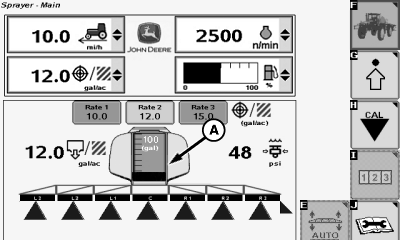
Press estimated volume remaining/refill button (A).
N120715-UN-10DEC15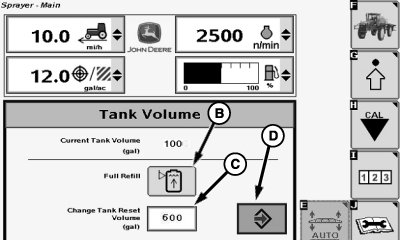
N84146-UN-08APR09A - Estimated Volume Remaining/Refill Button
B - Full Refill Button
C - Input Box
D - Enter Button
-
If volume after refilling is full, press the full refill button (B). This sets the tank level to the defined tank capacity.
-
If the tank level after refilling is not the same as the number shown in the input box (C) next to Change Tank Reset Volume (L), then you can enter a new level by selecting input box (C) next to Change Tank Reset Volume (L) and entering the new level using the pop-up keyboard. This will also change the Tank Volume value from the Spray Setup page.
-
Press the full refill button now after changing the tank volume value to set the tank level to the new tank volume.
-
Select the Enter button (D) to leave the pop-up window.
|
FC59002,0000092-19-20170109 |