Nozzle Flow Check
Nozzle flow check is a procedure to check your application rate at a desired speed. The following items can be determined:
- If the true application rate can meet the target application rate at a given speed.
- The true flow rate in L/min (gal/min) out of the spray boom.
- Whether the nozzles are worn.
- The pressure at the spray control valves given a desired speed and application rate.
-
If there is a pressure drop between the spray boom section shutoff
valves and nozzles.
IMPORTANT: Always fill the solution tank with clean water to do a proper nozzle flow check.
-
Select the Menu button.

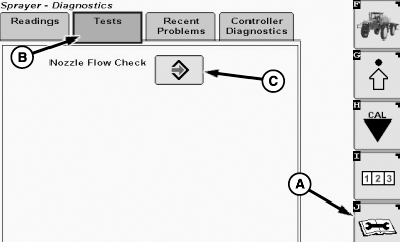
BM011391-UN-05APR17Menu Button → Sprayer Application Button → Diagnostics Menu Softkey → Tests Tab
N94041-UN-16NOV16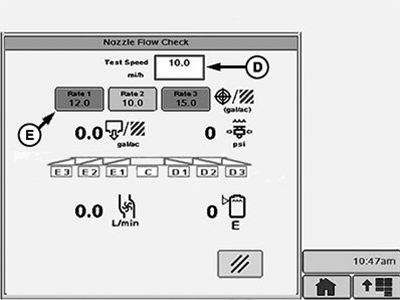
BM002494-UN-11JAN17A - Diagnostics Menu Softkey
B - Tests Tab
C - Nozzle Flow Check Button
D - Test Speed Input Box
E - Target Application Rates
-
Select the Sprayer Application button.
-
Select the Diagnostics Menu softkey (A).
-
Select the Tests tab (B).
-
Select the Nozzle Flow Check button (C).
-
Select the test speed input box (D).
-
Enter a speed value to be tested using the popup keypad.
-
Select the Accept button to accept the new value.
-
Turn the rate select switch to the target application rate to be tested (1, 2, or 3).
NOTE: Current target application rate (E) is shown on the screen.
-
Place a calibration container under a nozzle.
-
Move the hand throttle lever to full throttle position.
-
Turn on the solution pump switch.
-
Turn on the spray system master switch.
-
Note the flow value displayed on the screen.
-
Wait 1 min and turn off the spray system master switch and solution pump switch.
-
Move the hand throttle lever to low idle position.
-
Measure the collected amount in the calibration container.
-
Multiply the measured volume by the number of nozzles in spray boom. The result should be equal to the value shown on screen. If not:
- If the volume is higher than expected and pressure is lower than expected, nozzle tips could be worn.
- If the pressure is higher than expected for the given output, nozzle tips could be partially plugged. Also a pressure drop can occur from the spray boom section shutoff valves to nozzle tips (normally only associated with high flow rates.)
|
FC59002,0000093-19-20170405 |