BoomTrac Pro™ Page
Navigate to BoomTrac Pro™ Page (Option 1)
-

BM017293-UN-05APR17Menu Button → Sprayer Application Button → BoomTrac Pro™ Softkey
Select the Menu button. -
Select the Sprayer Application button.
-
Select the BoomTrac Pro™ softkey.
Navigate to BoomTrac Pro™ Page (Option 2)
-

BM017295-UN-06APR17Menu Button → Sprayer Application Button → BoomTrac Pro™ Button
Select the Menu button. -
Select the Sprayer Application button.
-
Select the BoomTrac Pro™ button.
BoomTrac Pro™ Page
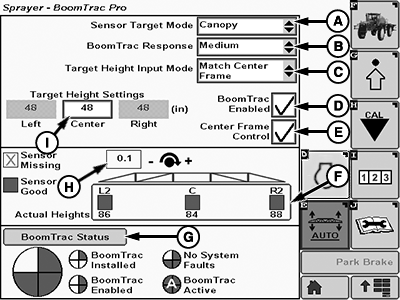
BM017288-UN-05APR17
- Sensor Target Mode (A): Allows the operator to select between Canopy or Ground target mode.
- BoomTrac Pro™ Response (B): Allows the operator to set the response level of BoomTrac Pro™.
- Target Height Input Mode (C): Allows the operator to select between Match Center Frame and Individual modes.
- BoomTrac Pro™ Enabled (D): Allows the operator to enable or disable the BoomTrac Pro™ using the resume button on the multi-function lever.
- Center Frame Control (E): Allows the operator to choose between center frame automatic height adjust or a target height.
- Spray Boom Section Sensor Softkey (F): Allows the operator to access the sensor setup page.
- BoomTrac Pro™ Status (G): Allows the operator to access the status page.
- Roll Sensor Reading (H): Displays the rotation direction of the center frame.
- Target Height Settings (I): Allows the operator to set the spray boom sections height.
|
BoomTrac Pro is a trademark of Deere & Company |
FC59002,000009A-19-20170413 |