BoomTrac Pro™ System Status Page
Navigate to BoomTrac Pro™ System Status Page
-
Select the Menu button.
-
Select the Sprayer Application button.
-
Select the BoomTrac Pro™ softkey (A) or the BoomTrac Pro™ button.

BM017293-UN-05APR17Menu Button → Sprayer Application Button → BoomTrac Pro™ Softkey → BoomTrac Pro™ Page

BM017295-UN-06APR17Menu Button → Sprayer Application Button → BoomTrac Pro™ Button → BoomTrac Pro™ Page
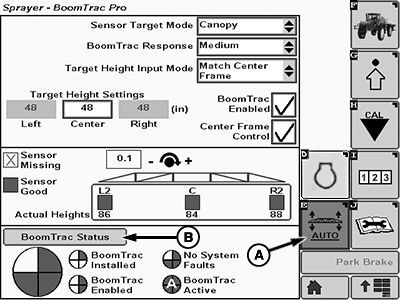
BM017299-UN-07APR17BoomTrac Pro™ Page
A - BoomTrac Pro™ Softkey
B - BoomTrac Pro™ Status Button
-
Select the BoomTrac Pro™ status button (B).
BoomTrac Pro™ System Status Page Informations
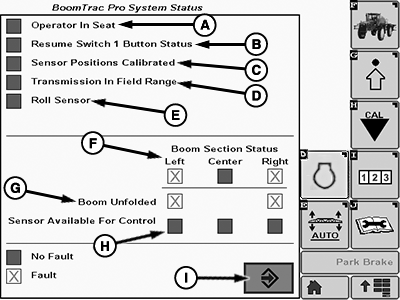
This page allows operator to check the status of the BoomTrac Pro™ when faults are present, and helps to find the problem solution.
BM017300-UN-07APR17
The next informations are displayed:
Operator In Seat (A): Shows status of the seat switch.
Resume Switch 1 Button Status (B): Shows if the resume button on the multi-function lever has failed.
Sensor Positions Calibrated (C): Shows if the sensor positions have been calibrated on machine.
Transmission In Field Range (D): Tells the operator that BoomTrac Pro™ will function as long as in field range.
Roll Sensor (E): Tells the operator that the roll sensor is within normal range.
Section Status (F): This row of boxes indicate if the individual spray boom sections are capable of being controlled. If there is an X present then that section cannot be controlled by the BoomTrac Pro™.
Boom Unfolded (G): Indicates the status of the inner fold sensors. An inner wing that is not unfolded completely keeps BoomTrac Pro™ from operating.
Sensor Available For Control (H): Gives the status that there is at least one functioning sensor available on each spray boom section for control.
Accept Button (I): Allows the operator to return to BoomTrac Pro™ page.
|
BoomTrac Pro is a trademark of Deere & Company |
FC59002,000009B-19-20170413 |