Calibrate Spray Boom Level Position
-
Set up the BoomTrac Pro™ sensors. (See Set up BoomTrac Pro™ Sensors in this Section.)
-
Select the Menu button.
-
Select the Sprayer Application button.
-
Select the Calibration Menu softkey (A).

BM011363-UN-31MAR17Menu Button → Sprayer Application Button → Calibration Menu Softkey → BoomTrac Pro™ Calibration Tab
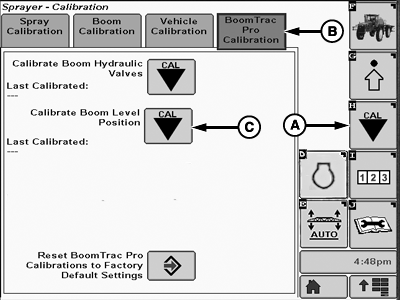
BM004530-UN-07APR17A - Calibration Softkey
B - BoomTrac Pro™ Calibration Tab
C - Calibrate Boom Level Position Button
-
Select the BoomTrac Pro™ Calibration tab (B).
-
Select the calibrate boom level position button (C).
-
Follow calibrate boom level position instructions.
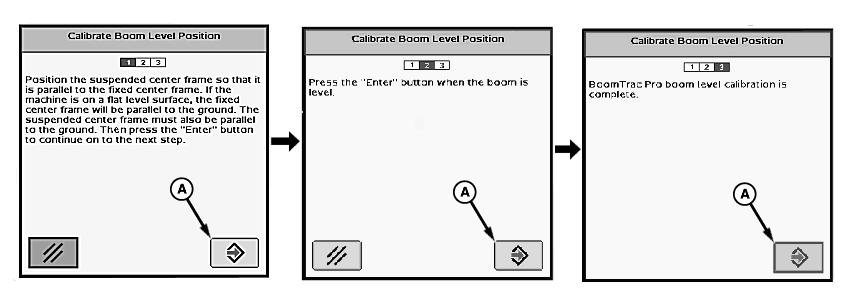
N77057-UN-25JUL07A - Accept Button
-
Select the accept button (A) to proceed to the next screens, until a message appears saying that the calibration is complete.
|
BoomTrac Pro is a trademark of Deere & Company |
FC59002,000009C-19-20170407 |