Calibrate Spray Boom Hydraulic Valves
-
Select the Menu button.
-
Select the Sprayer Application button.
-
Select the Calibration Menu softkey (A).

BM011363-UN-31MAR17Menu Button → Sprayer Application Button → Calibration Menu Softkey → BoomTrac Pro™ Calibration Tab
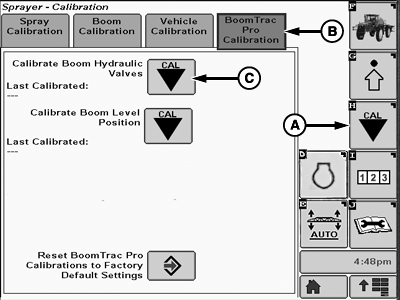
BM004531-UN-07APR17A - Calibration Softkey
B - BoomTrac Pro™ Calibration Tab
C - Calibrate Boom Hydraulic Valves Button
-
Select the BoomTrac Pro™ Calibration tab (B).
-
Select the calibrate boom hydraulic valves button.
-
Follow calibrate boom hydraulic valves instructions on screen. Warm up hydraulic oil, by raising and lowering all spray boom sections several times.
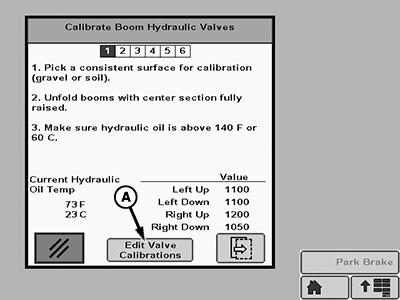
BM017301-UN-07APR17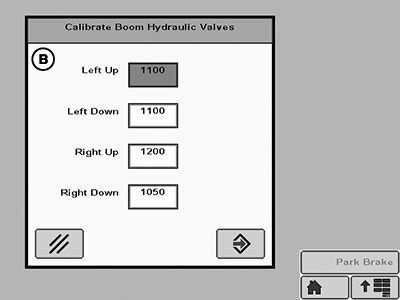
BM017302-UN-07APR17A - Edit Valve Calibration Button
B - Screen
NOTE: The values shown in this example are different for each section. The value listed is the minimum modulation required to open the tilt valve and provide motion to the spray booms.
-
Select edit valve calibrations button (A) to go to the screen (B). The input boxes from this screen allow the operator to change manually the calibration values.
IMPORTANT: Change manually these values can affect the spray booms performance. Only change if it is really necessary.
NOTE: Press the Reset BoomTrac Pro™ Calibrations to Factory Default Settings button on the BoomTrac Pro™ Calibration tab page, to return for the original settings.
|
BoomTrac Pro is a trademark of Deere & Company |
FC59002,000009D-19-20170413 |