Set up BoomTrac Pro™ Sensors
-
Select the Menu button.
-
Select the Sprayer Application button.
-
Select the BoomTrac Pro™ softkey or the BoomTrac Pro™ button.
-
Select the spray boom section sensor softkey (A).

BM017293-UN-05APR17Menu Button → Sprayer Application Button → BoomTrac Pro™ Softkey → BoomTrac Pro™ Page

BM017295-UN-06APR17Menu Button → Sprayer Application Button → BoomTrac Pro™ Button → BoomTrac Pro™ Page
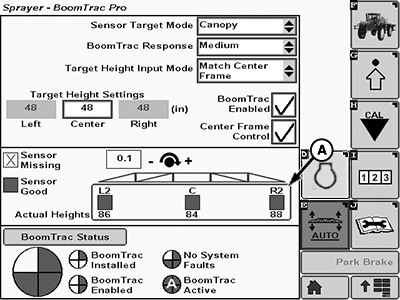
BM017289-UN-05APR17BoomTrac Pro™ Page
A - Spray Boom Section Softkey
NOTE: To set up BoomTrac Pro™ sensors, document the physical location of each sensors and its corresponding serial number on the bottom of the sensor. The location for left/right is as when the operator is sitting in the seat.
NOTE: If BoomTrac Pro™ is field installed or a faulty sensor is replaced, set up spray boom height sensors before any other changes or calibrations.
-
To set up each sensor, select any section softkey (A).
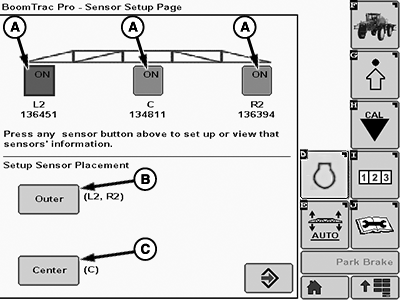
BM017290-UN-07APR17BoomTrac Pro™ Sensor Set up Page
A - Section Softkey
B - Outer Sensor Placement Softkey
C - Center Sensor Placement Softkey
-
To set up the outer sensors placement, select the outer sensor placement softkey (B).
-
To set up the center sensor placement, select the center sensor placement softkey (C).
Setting up Each Sensor Individually
-
Enable and disable the sensor with the checkbox (A).
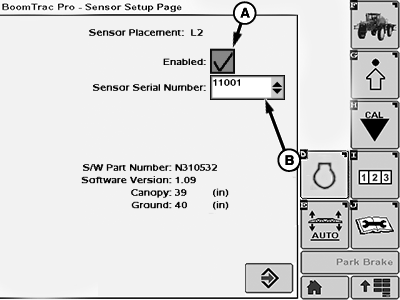
BM017291-UN-13APR17Sensor Set up Page
A - Checkbox
B - Drop-down Box
-
To insert the sensor serial number from that location, use drop-down box (B).
Setting up Outer Sensors Placement
-
Enter the outer sensors distance in the input box (A): distance from the center of the suspended center frame to the center of the outer spray boom BoomTrac Pro™ height sensor.
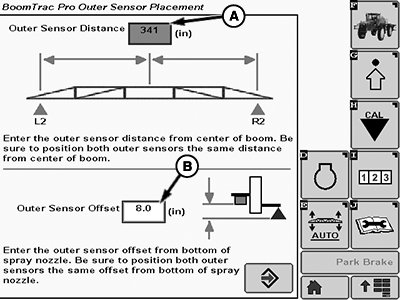
BM017292-UN-07APR17A - Input Box
B - Input Box
-
Enter the outer offset distance in the input box (B): distance from the bottom of the BoomTrac Pro™ sensor to the bottom of the spray boom nozzles.
NOTE: This value should be changed if a different bracket is used or the placement of the sensor on the spray boom is changed.
Setting up Center Sensors Placement
Enter the center sensor offset distance in the input box (A): distance from the BoomTrac Pro™ height sensor to the bottom of the center spray boom nozzles.
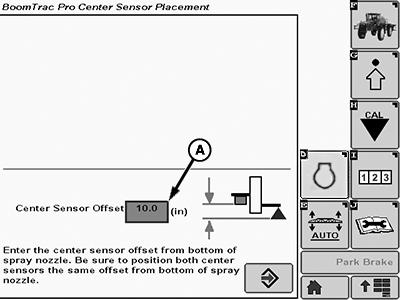
BM017294-UN-07APR17
Center Sensor Placement
A - Input Box
|
BoomTrac Pro is a trademark of Deere & Company |
FC59002,000009E-19-20170413 |