Diagnostic Trouble Codes (DTC)
To view the diagnostic trouble codes:
-
Select the Menu button.

BM011391-UN-05APR17Menu Button → Sprayer Application Button → Diagnostics Menu Softkey → Recent Problems Tab
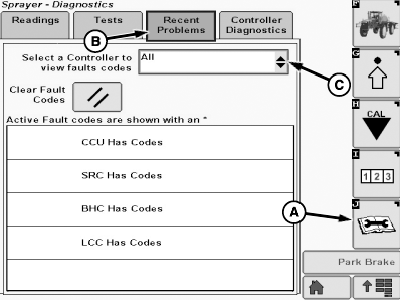
N93490-UN-16NOV16Recent Problems Page
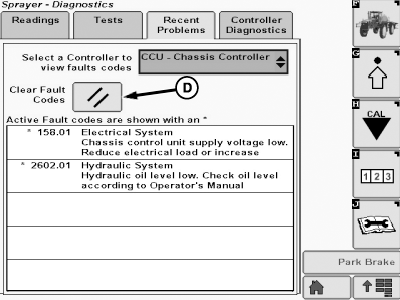
N93491-UN-16NOV16Recent Problems Page
A - Diagnostics Menu Softkey
B - Recent Problems Tab
C - Control Unit Input Box
D - Clear Fault Codes Button
-
Select the Sprayer Application button.
-
Select the Diagnostics Menu softkey (A).
-
Select the Recent Problems tab (B).
-
Select the control unit input box (C).
-
Select a specific control unit or select the All option:
- If the All option is selected, all control units that have trouble codes are listed. Select the specific control unit on the list to view its trouble codes.
- If a specific control unit is selected, all the related diagnostic trouble codes are listed. An * before the code indicates an active diagnostic trouble code.
NOTE: See the Diagnostic Trouble Codes Section for specific information about the DTCs.
-
To clear the diagnostic trouble codes, select the Clear Fault Codes button (D).
NOTE: Selecting the Clear Fault Codes button only clears the diagnostic trouble codes history. Active DTCs remain listed until they are solved.
|
FC59002,00000A1-19-20170405 |