Operate BoomTrac Pro™
 CAUTION: Stand clear of spray booms when BoomTrac Pro™ is activated. The spray booms move when objects are moved within
sensor range.
CAUTION: Stand clear of spray booms when BoomTrac Pro™ is activated. The spray booms move when objects are moved within
sensor range.
NOTE: The following screens may appear different from your display due differences regarding optional equipment, software version, or customization.
NOTE: The BoomTrac Pro™ can only be enabled if the operator is on the seat. If the operator gets up, the system is disabled.
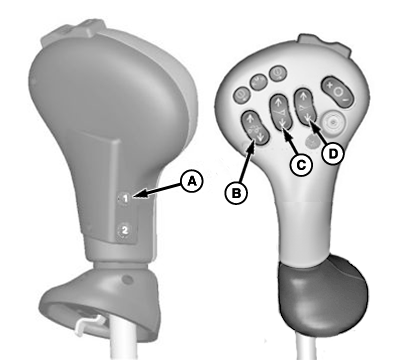
To activate the BoomTrac Pro™, press the BoomTrac Pro™ resume switch (A) at the multi-function lever.
BM017310-UN-13APR17
A - BoomTrac Pro™ Resume Switch
B - Center Spray Boom Raise/Lower Switch
C - Left-Hand Raise/Lower Switch
D - Right-Hand Raise/Lower Switch
To turn off the BoomTrac Pro™, press center spray boom raise/lower switch (B), left-hand spray boom raise/lower switch (C), or right-hand raise/lower switch (D).
To resume BoomTrac Pro™, press the BoomTrac Pro™ resume switch (A) again.
To save the current heights as the new target heights, press and hold the BoomTrac Pro™ resume switch (A) for three seconds.
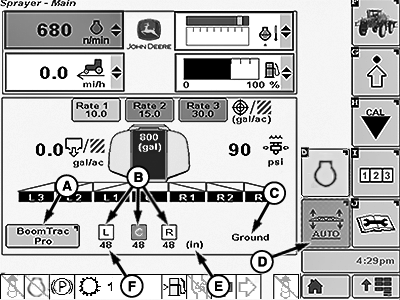
A BoomTrac Pro™ section is shown on Sprayer Main Page:
BM017287-UN-05APR17
A - BoomTrac Pro™ Button
B - Spray Boom Section Identification
C - Sensor Target Mode
D - BoomTrac Pro™ Softkey
E - Unit of Measure
F - Spray Booms Configurated Height
- BoomTrac Pro™ Button (A): Use to access the BoomTrac Pro™ page.
- Spray Boom Identification (B): The squares around the side spray booms first letter indicates that BoomTrac Pro™ is ready for operation. The side of the spray boom that is operating is identified like the center section in the picture.
- Sensor Target Mode (C): Shows the selected option (Canopy or Ground) in BoomTrac Pro™ page.
- BoomTrac Pro™ Softkey (D): Use to access the BoomTrac Pro™ page.
- Unit of Measure (E): The (in) or (cm) indicates the unit of measure that is being used for the spray booms height.
- Spray Booms Configurated Height (F): These numbers indicate the height of each spray boom section.
|
BoomTrac Pro is a trademark of Deere & Company |
JG50163,0000490-19-20170413 |