Alarm Setup
Flow Rate Alarm
The flow rate alarm tells the operator when the sprayer applies more or less than 20% of the target rate for 6 continuous seconds. LOW SOLUTION FLOW or HIGH SOLUTION FLOW also appears at the display. See the Solution System Diagnostic Trouble Codes in Diagnostic Trouble Codes Section.
-
Select the Menu button.

BM011351-UN-29MAR17Menu Button → Sprayer Application Button → Setup Menu Softkey → Spray Setup Tab
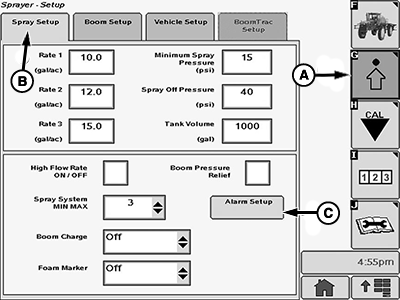
BM017153-UN-17NOV16Spray Setup Page
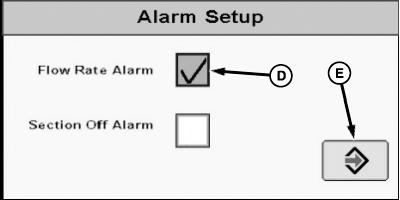
N93020-UN-16NOV16Alarm Setup Popup Window
A - Setup Menu Softkey
B - Spray Setup Tab
C - Alarm Setup Button
D - Flow Rate Alarm Checkbox
E - Accept Button
-
Select the Sprayer Application button.
-
Select the Setup Menu softkey (A).
-
Select the Spray Setup tab (B).
-
Select the Alarm Setup button (C). The alarm setup popup window appears.
-
Select the flow rate alarm checkbox (D). A check mark appears inside the checkbox.
-
To disable the flow rate alarm, select the flow rate alarm checkbox (D) once again. The check mark disappears from the checkbox.
-
Select the Accept button (E).
Section Off Alarm
The section off alarm occurs when one or more of the spray boom sections are disabled by the spray control switches when the spray system master switch is switched on.
-
Select the Menu button.
BM011351-UN-29MAR17Menu Button → Sprayer Application Button → Setup Menu Softkey → Spray Setup
BM017153-UN-17NOV16Spray Setup Page
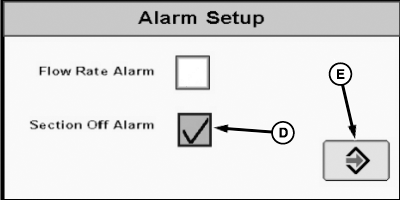
N93021-UN-16NOV16Alarm Setup Popup Window
A - Setup Menu Softkey
B - Spray Setup Tab
C - Alarm Setup Button
D - Section Off Alarm Checkbox
E - Accept Button
-
Select the Sprayer Application button.
-
Select the Setup Menu softkey (A).
-
Select the Spray Setup tab (B).
-
Select the Alarm Setup button (C). The alarm setup popup window appears.
-
Select the section off alarm checkbox (D). A check mark appears inside the checkbox.
-
To disable the section off alarm, select the section off alarm checkbox (D) once again. The check mark disappears from the checkbox.
-
Select the Accept button (E).
|
LS87647,000063D-19-20170404 |